
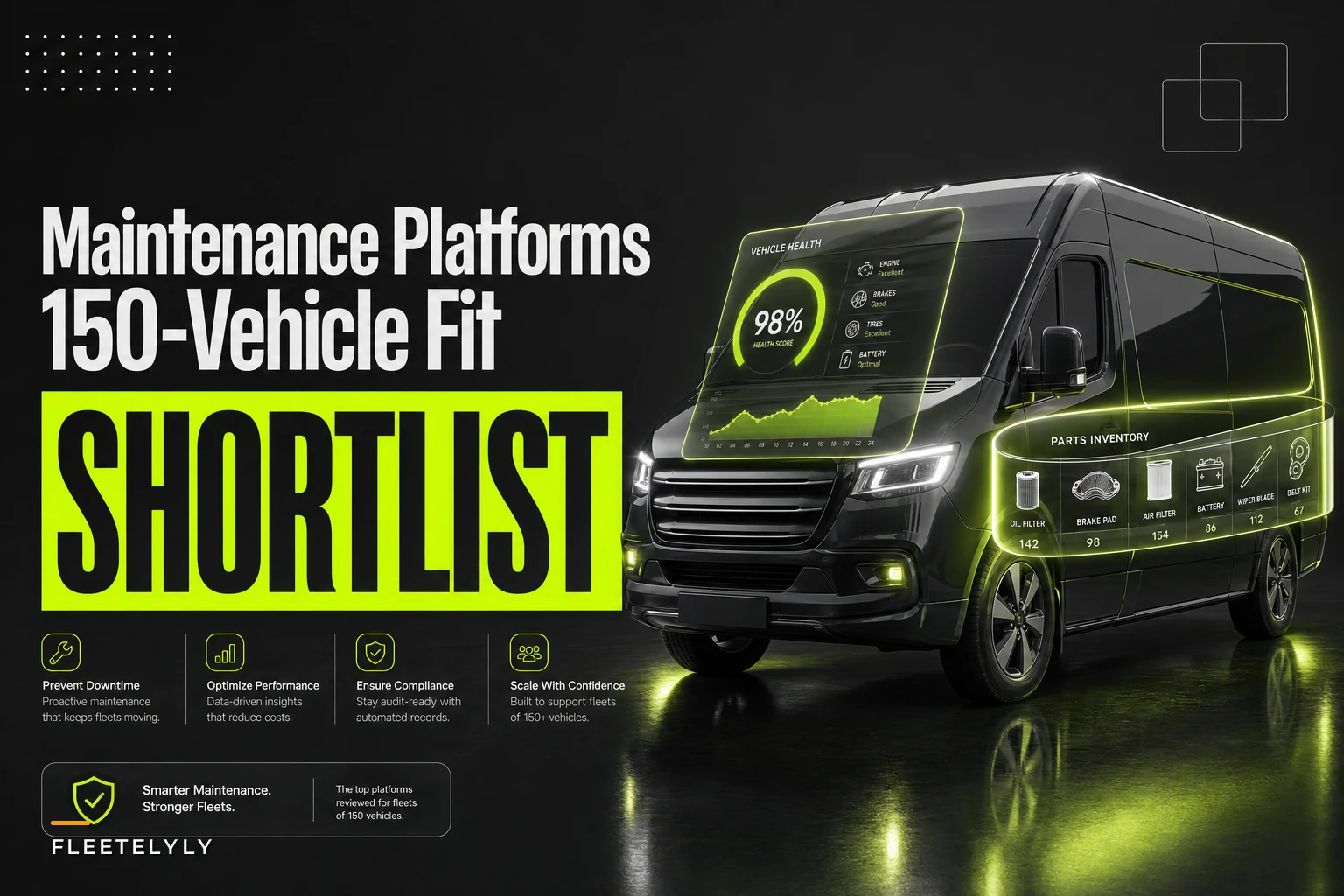

A 150-vehicle urban delivery fleet sits in an awkward spot. You're too big for spreadsheet-and-whiteboard scheduling, but too small to justify a six-figure enterprise asset management rollout with a dedicated admin team. Most procurement guides either talk down to you with generic "top 10" lists or push enterprise suites built for 2,000-vehicle operations that will crush your budget and your maintenance supervisor's patience.
This brief does something narrower. It shortlists four platforms that genuinely fit a mid-size urban delivery operation, judges them against four non-negotiables — maintenance scheduling, parts/inventory management, a native mobile mechanic app, and real telematics integrations — and hands you the RFP checklist, integration-test plan, timeline, and scorecard to run the evaluation yourself.
Everything here is evergreen. If you landed here because of recent parts-availability pressure tied to the Aug. 26 bulk-power equipment order, treat that as background context only — this guide is about selecting software, not reacting to a single policy event.
Why "150 vehicles" changes the shortlist
The vehicle count matters more than people expect. At 150 vehicles running urban delivery routes, you have specific operational realities that shape what software actually works:
-
You're probably running one to three shop locations, not fifty. Multi-depot complexity is minimal.
-
Your mechanics are mobile or bay-based, often both — a field tech might handle a roadside no-start before swinging back to the shop. The mobile app can't be an afterthought.
-
Your telematics data volume is real but not massive. You need clean integrations, not a custom data-engineering project.
-
Your parts room is a cost center you can actually control. Inventory accuracy at this scale directly moves your parts spend.
The wrong-size tool fails in predictable ways. Enterprise platforms drown a 150-vehicle team in configuration overhead that never gets finished. Lightweight apps hit a wall the moment you need real parts costing or a telematics webhook that doesn't break every firmware update. The sweet spot is a platform that does the four core jobs well and integrates without a consulting engagement.
One thing buyers consistently underestimate: the native mobile app is usually what determines adoption. If your mechanics hate the app, your data quality collapses within a quarter and every downstream report becomes fiction. Weight it heavily.
The four shortlisted platforms
Each vendor below gets one sentence on fit and one on integration strength. Deliberately concise — the point is to narrow your field, then let the RFP and demo scorecard do the real work.
Prevent costly breakdowns with proactive maintenance.
Fleetelyly helps you schedule, track, and manage every vehicle service efficiently.
- Automated maintenance reminders
- Real-time service tracking
- Parts inventory integration
No credit card required
Fleetio
-
Fit
Strong match for a 150-vehicle delivery fleet that wants fast setup, a well-regarded mobile mechanic app, and parts/inventory without enterprise bloat.
-
Integration strength
Mature, documented integrations with Geotab, Samsara, and Motive, plus a stable API and webhook support that survives most telematics firmware changes.
Whip Around
-
Fit
Best when your pain starts at the inspection and DVIR layer and you want mobile-first defect capture flowing cleanly into scheduled work.
-
Integration strength
Solid telematics connections (Samsara, Geotab) with inspection-to-work-order automation that cuts manual re-entry on the shop side.
Fleet Maintenance Pro / RTA Fleet
-
Fit
Good for teams that want deeper parts costing, work-order history, and a more traditional maintenance-management backbone with less emphasis on slick UI.
-
Integration strength
Established telematics tie-ins and strong inventory/parts modules, though integration setup tends to be more hands-on than the newer cloud platforms.
Samsara (Maintenance module)
-
Fit
Makes sense when you're already running Samsara telematics and want maintenance scheduling and fault-code-driven work orders native to the same platform.
-
Integration strength
The integration is the telematics — fault codes, engine hours, and DTCs flow directly into PM scheduling with no third-party pipeline to maintain.
Worth naming explicitly: the single-vendor telematics-plus-maintenance option (Samsara here) removes integration risk but locks you to one telematics provider. Best-of-breed options like Fleetio or Whip Around give you flexibility but put integration health on you. Neither is wrong — it depends on how committed you are to your current telematics hardware.
Objective selection criteria
Score every vendor against these, not against demo polish. The demo is designed to impress you. The criteria below are designed to protect you.
| Criterion | What "good" looks like for 150 vehicles | Weight |
|---|---|---|
| Maintenance scheduling | PM schedules by mileage, engine hours, calendar, AND fault code; handles exception rules | High |
| Parts/inventory | Real-time stock levels, parts costing on work orders, low-stock alerts, multi-location | High |
| Mobile mechanic app | Native (not mobile web), offline capture, photo attach, work-order close-out in the field | High |
| Telematics integration | Named, documented integration with YOUR provider; webhook or API, not CSV import | Critical |
| Reporting | PM compliance, cost-per-mile, cost-per-vehicle, parts spend by category | Medium |
| User admin | Role-based access, easy tech onboarding, audit trail | Medium |
| Pricing model | Per-vehicle or flat; predictable as fleet grows to 180–200 | Medium |
| Support & onboarding | Named onboarding contact, realistic go-live plan, responsive support tier | Medium |
The one criterion people skip and regret: fault-code-driven scheduling. If your telematics flags a check-engine or a specific DTC and your software can't automatically route that into the right work-order bucket, you've bought a glorified calendar. Verify this works end-to-end in the demo, with a real fault code, not a slide.
Sample RFP checklist
Send this to each shortlisted vendor. Keep it short enough that they'll actually answer it, specific enough that vague answers stand out.
-
Do you offer a documented, named integration with [your telematics provider]? API, webhook, or file-based?
-
Can PM schedules trigger off fault codes/DTCs automatically? Describe the workflow.
-
Is the mobile mechanic app native iOS/Android, and does it function offline?
-
How are parts costs applied to work orders — manual entry, catalog lookup, or supplier integration?
-
What's your per-vehicle pricing at 150 units, and how does it change at 200?
-
What does onboarding look like — timeline, assigned contact, data migration support?
-
Can you provide two reference customers running 100–250 vehicles in urban delivery or similar?
-
What's your API rate limit and uptime SLA?
-
How do telematics integrations handle provider firmware updates — who's responsible when a field mapping breaks?
-
Export rights
if we leave, how do we get our full maintenance history out?
That last question filters out vendors who make exit painful. Ask it early and watch how comfortably they answer.
Integration-test plan
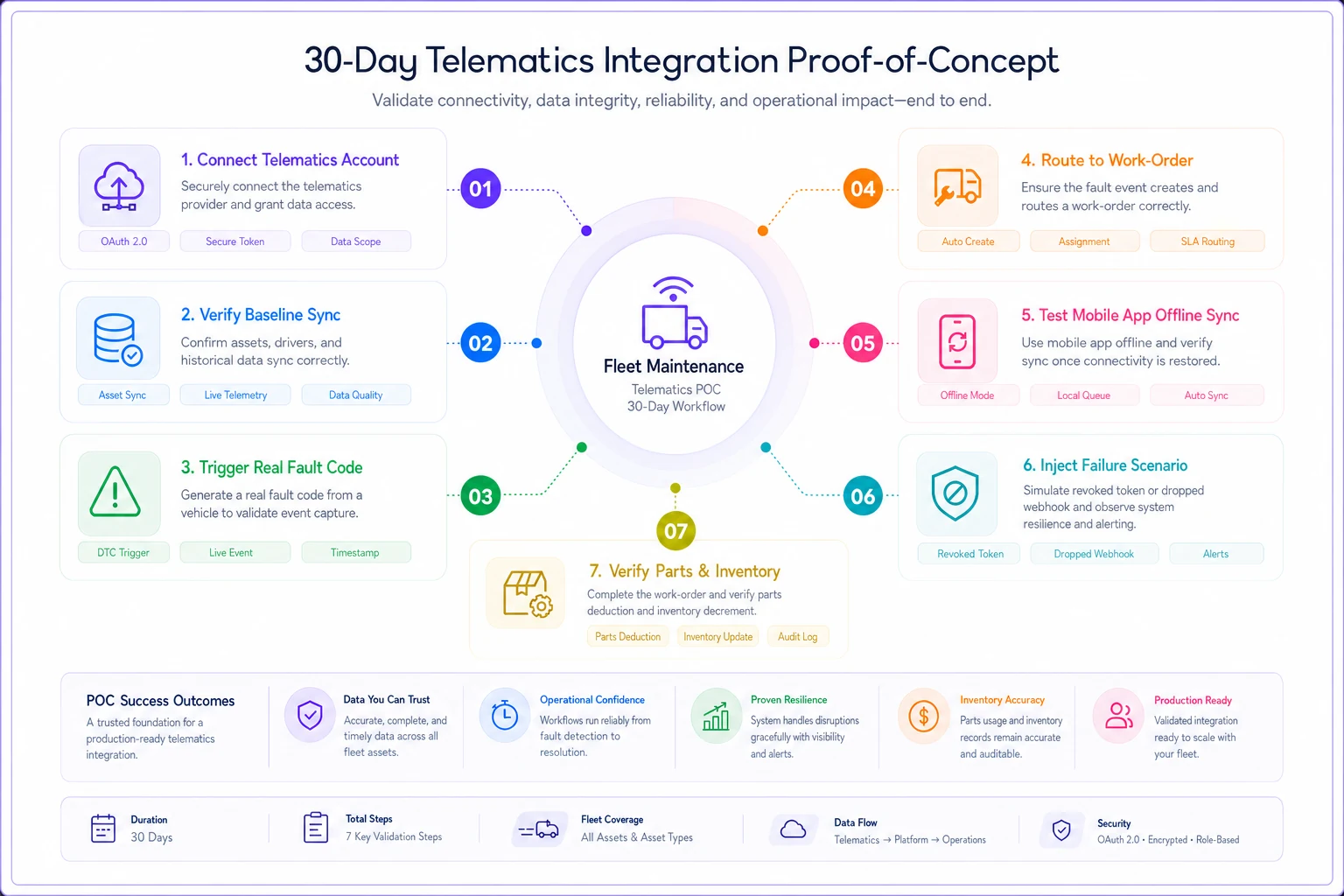
Don't take "yes, we integrate with Samsara" at face value. The integration either works under your conditions or it doesn't, and you find out during a 30-day proof-of-concept — not after signing.
-
Connect one telematics account to the trial environment with 8–12 real vehicles, mixed makes if your fleet is mixed.
-
Verify baseline sync — odometer, engine hours, and vehicle identity match between telematics and the maintenance platform within the sync interval.
-
Fire a real fault code. Trigger or wait for an actual DTC and confirm it lands in the platform and routes to the correct work-order category based on your rules.
-
Test the mobile app offline. Have a tech complete a work order in a parking garage or basement with no signal, then confirm it syncs cleanly when connectivity returns.
-
Inject a failure. Temporarily revoke the telematics API token or simulate a dropped webhook. Does the platform alert you, queue the data, or silently lose it? Silent loss is a disqualifier.
-
Check parts deduction. Close a work order that consumes parts and confirm inventory levels decrement correctly and cost lands on the order.
Run this sequence with real vehicles and real data, not a vendor-curated sandbox:
Spend an afternoon breaking things on purpose during the trial.
A recurring mistake: teams test the happy path only and discover the failure-handling gaps in month three of production. Spend an afternoon breaking things on purpose during the trial. It's the cheapest insurance in the whole process.
Expected implementation timeline
For a 150-vehicle fleet with reasonably clean existing data, a realistic go-live runs about 6 to 10 weeks. The variance is almost entirely driven by data quality and telematics setup, not by the software itself.
Weeks 1–2 → Data gathering (VINs, PM schedules, parts catalog, open work orders) Weeks 2–4 → Platform config (PM rules, user roles, parts import, shop locations) Weeks 3–5 → Telematics integration + full integration-test plan Weeks 5–7 → Mechanic app rollout + parallel run with old process Weeks 7–10 → Cutover, monitoring, rule tuning, data gap cleanup
Where timelines actually slip: dirty parts catalogs. If your current parts list has duplicate SKUs, inconsistent naming, or no cost data, that cleanup eats your schedule. Budget time to rationalize the catalog before migration, not during. Teams that skip this step almost always regret it by week five.
TCO considerations most buyers miss
The per-vehicle license fee is the easy number. Total cost of ownership for a 150-vehicle rollout includes several lines that don't show up on the quote.
Most fleets focus entirely on the license cost and underestimate everything else. The parts-catalog cleanup alone can burn several days of someone's full attention, and that's before you factor in pulling mechanics off the floor for app training.
-
License Typically per-vehicle, often landing somewhere in the range of a few dollars to low-teens per vehicle per month depending on tier — do the math at 150 and again at 200.
-
Onboarding/implementation Sometimes free, sometimes a one-time fee. Ask directly.
-
Data migration labor Mostly your team's time. The parts-catalog cleanup alone can run several days of someone's attention.
-
Telematics integration maintenance When firmware changes break a field mapping, who fixes it and is it billable?
-
Training time Pulling mechanics off the floor to learn the app is a real cost. Factor a few hours per tech.
-
Internal admin Someone owns the system. At 150 vehicles that's usually a fraction of one person's role, but it's not zero.
The hidden TCO killer is low adoption. A platform your mechanics route around costs you the license fee plus the fiction it injects into your reporting. Fleets quietly abandon a tool within two quarters because the mobile app added friction instead of removing it — and they still paid the annual contract. Adoption is the real ROI lever.
Vendor demo scorecard
Use the same scorecard for every vendor. Score 1–5, multiply by the weight, total it. Forcing yourself to score in the room prevents the "they seemed nice" bias from skewing your decision.
| Demo element | Weight | Vendor A | Vendor B | Vendor C | Vendor D |
|---|---|---|---|---|---|
| Fault-code → work-order (live demo) | 5 | ||||
| Mobile app usability (hands-on) | 5 | ||||
| Parts/inventory on work orders | 4 | ||||
| PM scheduling flexibility | 4 | ||||
| Telematics integration (your provider) | 5 | ||||
| Reporting depth | 3 | ||||
| Pricing clarity | 3 | ||||
| Onboarding plan credibility | 3 |
Two rules for running the demo: insist on using your telematics provider in the live demo, and insist on a hands-on moment where one of your actual mechanics touches the mobile app. A polished sales rep driving a perfect demo tells you nothing about how a tired tech at 6pm will experience it.
A realistic selection scenario
A regional last-mile delivery operation running around 150 vans across two depots had been managing PM on a shared spreadsheet with telematics alerts landing in a supervisor's inbox. Missed PMs were running higher than anyone wanted to admit, and the parts room had no real-time count — stockouts on brake pads and filters forced after-hours parts runs a couple times a month.
They shortlisted three of the four platforms above, ran a 30-day proof-of-concept on 10 vehicles with their Samsara integration live, and executed the failure-injection test. One vendor silently dropped a simulated webhook failure and got cut on the spot. They went with a best-of-breed platform with a strong mobile app, went live in roughly nine weeks, and the catalog cleanup was the only real bottleneck.
Within the first couple months, PM compliance moved from roughly two-thirds on time to the high 80s, and the emergency parts runs dropped to near zero once low-stock alerts fired automatically. Nothing dramatic or overnight — just steadier operations and a parts room that finally matched reality. The outcome that mattered most wasn't a headline metric; it was that mechanics actually used the app, so the data stayed trustworthy.
When this shortlist fits — and when it doesn't
When it makes sense: You're running 100–250 vehicles, you want the four core capabilities done well, and you'd rather configure a proven platform than build custom tooling. All four options here are sized for that.
When it's a bad idea: If you're heading toward 1,000+ vehicles with complex multi-regional operations, warranty-recovery automation, and deep ERP integration, you'll outgrow most of these and should be looking at enterprise asset management instead. And if you're under roughly 40 vehicles, even these may be more than you need — a lighter tool will do.
Who should skip the best-of-breed route entirely: Fleets fully committed to a single telematics provider with no intention of switching. For them, the native maintenance module inside their telematics platform removes integration risk and is often the pragmatic call, even if the maintenance feature depth is slightly thinner.
Recommended next steps
The platforms here are all credible for a 150-vehicle urban delivery fleet. The difference between a good outcome and a stalled rollout almost never comes down to which logo you pick — it comes down to how rigorously you test the integration and how honestly you assess whether your mechanics will actually use the thing every day.
-
Confirm your telematics provider — it's the single biggest filter on this list.
-
Send the RFP checklist to all four vendors; cut any who can't name an integration with your provider.
-
Shortlist to three and book demos using the scorecard, your telematics data, and a real mechanic on the app.
-
Run the 30-day integration-test plan, including failure injection, on your top two.
-
Clean your parts catalog in parallel so migration doesn't stall.
-
Decide on scorecard totals plus TCO at your projected 200-vehicle size, not just today's 150.
Run the process above and you'll know the answer before you sign anything.
Run the process above and you'll know the answer before you sign anything.
Ready to maximize fleet uptime and reduce maintenance costs?
Join 2,000+ fleet managers using Fleetelyly to streamline maintenance workflows and improve vehicle reliability.