

A brake job with 90 minutes of actual wrench time shouldn't cost three hours of shop clock. But it does, constantly — and most of that lost time never touches a torque wrench. It's a tech walking to the parts crib, waiting for someone to locate the right caliper hardware kit, finding out the bleeder screws are backordered, then standing around while a service writer chases a substitution. None of that shows up cleanly in your labor reports. It just quietly inflates your MTTR and makes the shop feel slower than it actually is.
Kitting fixes a specific slice of this problem: the recurring, predictable repairs where you already know every part before the vehicle rolls in. This isn't about kitting everything. It's about building a parts kitting SOP for fleet repairs that repeat often enough that you can pre-stage them and stop reinventing the parts pull every single time. Here's how to define kits, replenish them without babysitting, and actually measure whether any of it worked.
Start with job-family kits, not part numbers
The mistake most shops make when they first try kitting is building kits around vehicles. "Kit for the 2019 F-250." That falls apart fast because you end up with hundreds of kit variations and none of them move enough to justify the shelf space.
The better unit is a job family — a repair type grouped across vehicles that share the same parts. A front brake service on your light-duty Ford fleet might cover four model years and three trims but use the same rotor, pad set, caliper hardware, and sensor. That's one kit definition, not twelve.
| Field | Example | Why it matters |
|---|---|---|
| Kit name | LD-Ford-FrontBrake-A | Human-readable, tied to a job family not a VIN |
| Applies to | F-150/F-250 2017–2021, base + XL | Defines coverage without exploding variants |
| Core parts | 2x rotor, 1x pad set, 1x hardware kit, 2x sensor | The parts you need on 95% of these jobs |
| Consumables | Brake clean (2 cans), anti-seize, thread locker | The stuff techs "forget" to charge |
| Optional/situational | Caliper, brake line, ABS sensor | Pulled only if inspection calls for it |
| Fasteners | Caliper bracket bolts x4 | The single most common cause of a mid-job stall |
| Time-to-kit | ~4 min | Baseline for measuring replenishment labor |
Notice the split between core and situational parts. This is where most people get it wrong. If you cram every possible part into the kit, consumption becomes unpredictable and replenishment turns into a mess. Keep the kit tight around what's needed on the vast majority of jobs, and let situational parts get pulled separately with a quick note.
A practical rule from real shop floors: if a part shows up on fewer than roughly 8 out of 10 tickets for that job family, it doesn't belong in the core kit.
Why kits fall apart without kanban
Plenty of shops build kits, feel good about it for two weeks, then abandon them. The reason is almost always replenishment. Someone pulls a kit, the shelf empties, nobody reorders, and the next tech opens a half-empty box and loses trust in the whole system. Once techs stop trusting kits, they go back to pulling parts loose — and now you're carrying kit inventory and doing manual pulls.
Prevent costly breakdowns with proactive maintenance.
Fleetelyly helps you schedule, track, and manage every vehicle service efficiently.
- Automated maintenance reminders
- Real-time service tracking
- Parts inventory integration
No credit card required
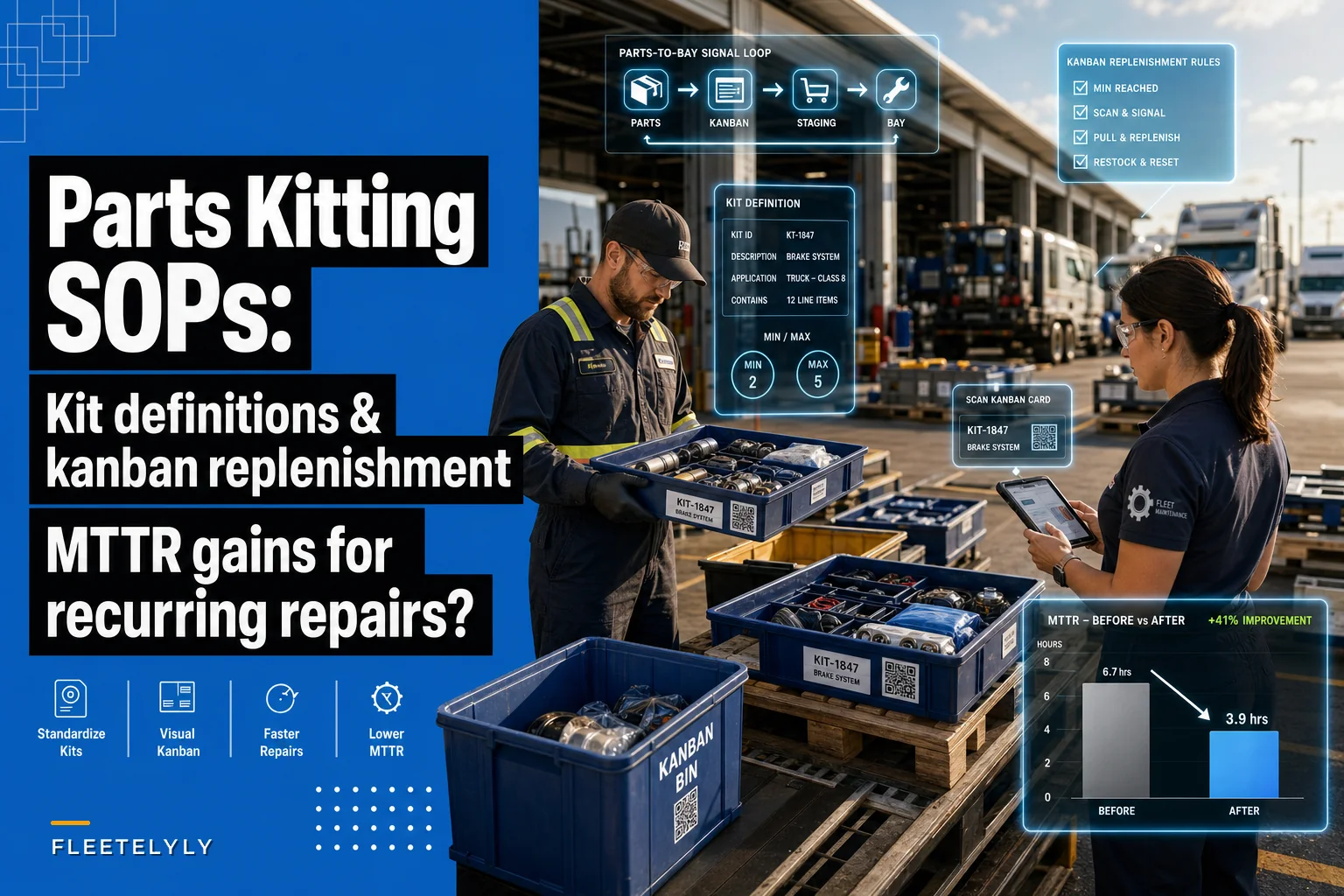
Kanban solves this because it ties replenishment to consumption instead of to someone remembering. The concept is old and boring and works exactly because it's simple: when a kit gets used, a signal fires to build another one.
-
Bin A holds ready-to-use kits on the staging shelf.
-
Bin B (or a kanban card in the empty slot) is the trigger. When a tech pulls the last kit and hits the reorder point, the card goes to the parts person.
-
The parts person builds kits back to the max, using the pre-built kit definition as a picklist.
The two numbers that matter for each kit are your min (reorder point) and max (how many you build back to). For a high-volume job family, you might keep a min of 3 and a max of 8. For something you do a handful of times a month, min 1, max 2. If you've already worked through criticality tiers and lead-time math for individual parts, the same logic applies here — you're just applying it to a bundle instead of a line item.
The subtle failure: shops set kanban levels once and never touch them again. A job family's volume shifts — you onboard 20 new vans, or you retire a platform — and the kit levels no longer match reality. Empty shelves and dead stock both trace back to stale min/max. Review kit levels quarterly, same cadence you'd use for any inventory tune-up.
Lay out the kit station so it removes steps, not adds them
A kitting program lives or dies on the walk. If your staged kits are 80 feet from the bay, you haven't removed motion — you've just relocated it. Layout matters as much as kit contents.
-
Kits live at point-of-use. Put the ready-kit shelf inside or immediately adjacent to the bays doing that work. Brake kits near the brake bays. PM kits near the PM lane.
-
One glance = one status. Color-coded or clearly labeled slots so a tech and the parts person both know instantly whether a kit is ready, in-progress, or empty.
-
Return path for cores and leftovers. If a situational part didn't get used, there's a defined spot to return it — otherwise it disappears into a toolbox and your counts drift.
-
The kanban trigger is physically in the way. The reorder card should be impossible to miss. Behind the last kit, taped to the empty slot, wherever the tech's hand goes when they grab the final one.
Place the ready-kit shelf inside or immediately adjacent to the target bays so the kit is truly point-of-use and not another trip.
This ties directly into how you've mapped your bays. If you've already done the work of takt time and bottleneck mapping for your maintenance bays, you already know which repairs are choking throughput. Those are the exact job families to kit first — kitting a repair that isn't a bottleneck feels productive but barely moves your numbers.
A pilot process you can run in two weeks
Don't roll kitting shop-wide. Pick two or three job families and prove it works first. Here's the sequence:
-
Pull 90 days of work orders and rank job families by frequency. Pick the top 2–3 that are recurring and parts-predictable.
-
Measure baseline MTTR for those specific jobs — not shop-wide MTTR, but the MTTR for that repair. Include parts-pull time, not just wrench time. This is the number everyone forgets to capture, and without it you can't prove anything.
-
Write the kit definition using the field structure above. Split core vs. situational.
-
Set min/max and build the first batch of kits. Stage them at point-of-use.
-
Install the kanban trigger and brief the techs and parts person on exactly what "pull, signal, rebuild" looks like.
-
Run for 3–4 weeks, logging every time a kit was short, wrong, or missing a part. Those shortage logs are gold — they tell you exactly how to fix the kit definition.
-
Re-measure MTTR for the same job families and compare.
The shortage log in step 6 is what people skip, then wonder why their kits never improve. Every "I had to go grab a part" is a data point telling you the core/situational split was off.
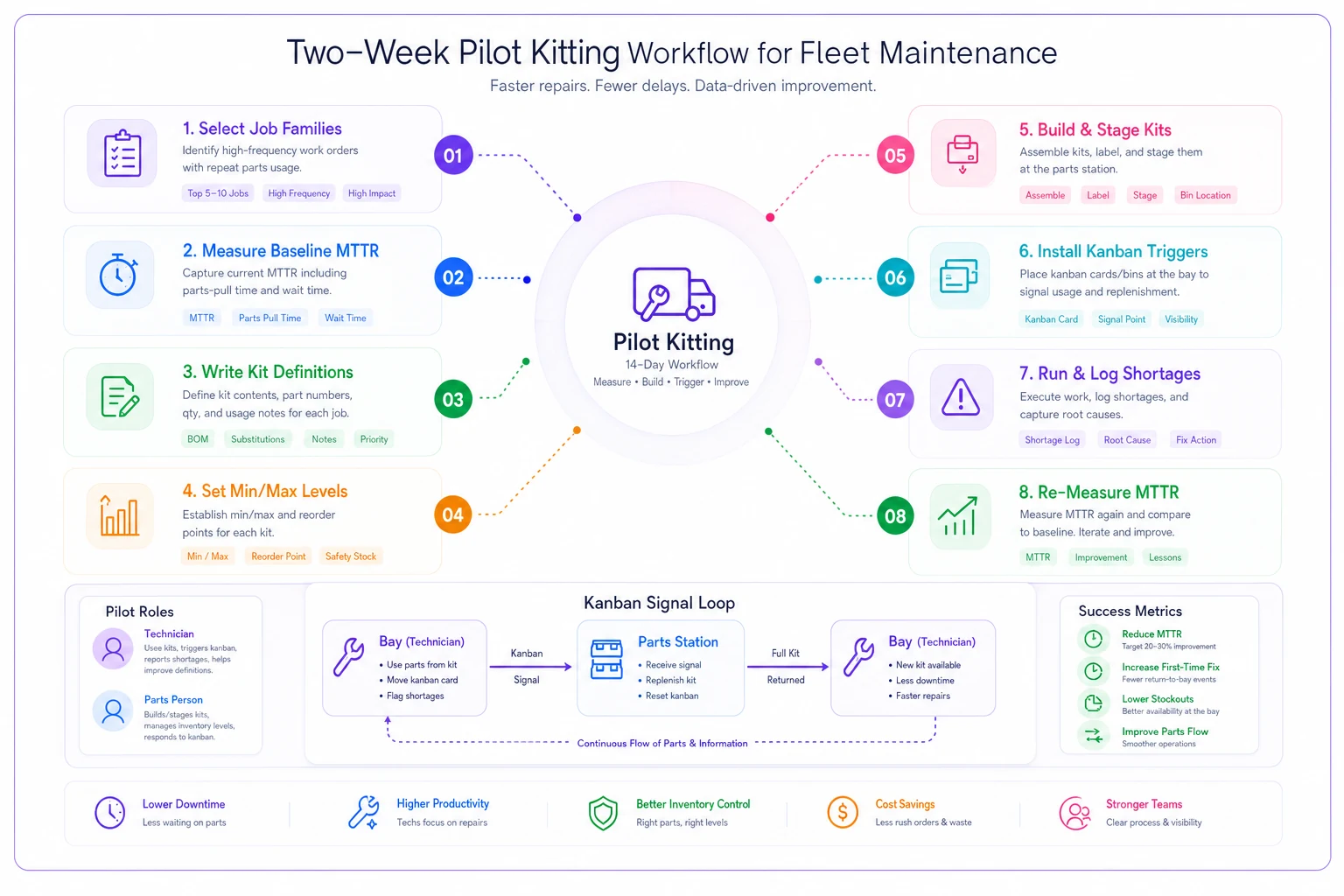
This diagram maps the pilot workflow from selecting job families through re-measurement and shows the kanban signal loop between techs and the parts person.
What "before and after" actually looks like
Here's a realistic picture from a mid-size fleet shop running about 12 bays, mostly light and medium-duty.
They kitted three job families first: front brakes, PM-B service, and a common water pump replacement. Baseline MTTR on the brake job — measured door-to-done including parts pulls — was sitting around 2h 50m even though wrench time was closer to 95 minutes. The gap was entirely motion, waiting, and substitution chasing.
-
Brake job MTTR dropped to roughly 2h 05m–2h 15m. Most of the gain came from eliminating parts-crib round trips and the recurring "hardware kit is missing" stalls.
-
PM-B service came down by a smaller margin, maybe 20 minutes, because the parts count was lower to begin with.
-
The water pump job barely moved. Turned out that repair had too much diagnostic variability, and kitting the wrong situational parts actually created a return-and-restock headache.
That last point is the honest takeaway. Two of three kits were clear wins. One was a wash. That's a normal result, and it's why you pilot instead of betting the whole shop on it.
The other quiet win: consumables started getting captured. Brake clean, anti-seize, thread locker — stuff that used to walk off unbilled now sat inside the kit and got tracked. Across three job families that recovered a few hundred dollars a month that had been silently leaking out.
When kitting makes sense — and when it doesn't
Kitting isn't free. You're building inventory, dedicating shelf space, and adding a replenishment task. It only pays off under specific conditions.
It makes sense when:
-
The repair recurs often — think dozens of times a month across the fleet.
-
The parts are predictable before the vehicle is on the lift.
-
Your bottleneck is motion and parts availability, not diagnosis or labor skill.
-
You have a parts person who can own replenishment.
It's a bad idea when:
-
The job has high diagnostic variability (that water pump example).
-
Volume is low and sporadic — you'll carry dead stock.
-
Parts availability is already unstable due to lead-time surges; kit before you've stabilized supply and you'll just have empty kits.
-
Nobody owns the replenishment loop. Kitting without an owner is guaranteed to rot.
Who should hold off: a shop that hasn't stabilized staffing. If your techs are constantly shuffling and cross-covering, focus there first — sort out technician scheduling and cross-skilling before layering kitting on top. A kitting SOP assumes there's a consistent person to pull kits and a consistent person to rebuild them. Fix the people flow, then optimize the parts flow.
Keeping kits honest over time
The failure mode of a mature kitting program isn't dramatic — it's drift. Kit definitions slowly go stale as vehicles change. Min/max levels stop matching volume. Situational parts creep into the core kit because one tech kept needing them and nobody updated the SOP formally.
A light quarterly review handles this. Pull the shortage logs, check consumption against your min/max, and confirm the job families you kitted still match your actual repair mix. Where digital work-order and inventory systems help is closing the loop between consumption and reorder automatically — flagging when a kit's usage pattern shifts or when replenishment falls behind demand, so you're not relying on a card getting noticed on a busy Friday. But the discipline matters more than the tooling. A shop with a whiteboard and an owned process beats a shop with great software and no ownership every time.
Start with two job families. Measure the real MTTR including parts time. Log every shortage. Kill the kits that don't earn their shelf space, and double down on the ones that do. That's the whole program — small, measurable, and honest about what actually moves the needle.
Ready to maximize fleet uptime and reduce maintenance costs?
Join 2,000+ fleet managers using Fleetelyly to streamline maintenance workflows and improve vehicle reliability.