


Most fleet IT rollouts don't fail in the data layer. The APIs connect, the telematics feed lands in the work-order system, the dashboards render. On paper, go-live is a success. Then three weeks later you look at adoption and half the techs are still writing work orders on paper, the shop lead is quietly maintaining a shadow spreadsheet, and parts is double-entering everything because nobody trusts the new numbers yet.
That gap — between "the system works" and "people actually use the system" — is where maintenance IT change management lives or dies. And the reason it keeps catching fleets off guard is that these are two completely different rollouts running on two completely different clocks. The technical track moves in sprints and cutover dates. The people track moves at the speed of trust, habit, and whether the night-shift mechanic thinks the new tablet is going to get him in trouble. Run them on one track and you get the classic outcome: a technically flawless deployment that nobody adopts. This article is about running both tracks at once, on purpose, with the right gates and the right conversations at the right time.
The two tracks, and why collapsing them into one is the original sin
When a rollout plan exists at all, it's usually a single Gantt chart owned by whoever is most technical. Integration milestones, UAT, cutover, done. Adoption shows up as a single bar near the end labeled "training."
That framing is the problem. Training is an event. Adoption is a process. And when you hide a months-long behavioral change behind a two-hour training session scheduled the week of go-live, you've guaranteed the shop will reject the thing right when you have the least slack to fix it.
Here's the distinction that actually matters:
| Dimension | Technical track | People / process track |
|---|---|---|
| Owner | Integration lead / IT | Shop ops lead / maintenance manager |
| Unit of progress | Features connected, tests passed | Behaviors changed, workflows replaced |
| Clock speed | Weeks (sprint-paced) | Months (habit-paced) |
| "Done" signal | Data flows correctly | Old workaround disappears |
| Main risk | Broken pipelines, bad data contracts | Shadow systems, quiet non-use |
| Failure is visible... | Immediately | 3–6 weeks after go-live |
The last row is the killer. Technical failures scream. Adoption failures whisper. By the time you notice adoption is dead, the vendor invoice is paid and leadership thinks the project shipped.
The fix isn't to slow down the technical track. It's to start the people track earlier and gate the technical track against people readiness — not the other way around. If you've already built a phased roadmap for fleet maintenance modernization with quarterly gates, this is the layer that sits underneath each gate and tells you whether the shop is actually ready to pass it.
Map the stakeholders by what they can kill, not by the org chart
Most stakeholder maps are useless because they mirror the reporting structure. The people who can quietly kill a maintenance rollout rarely sit at the top of it.
Prevent costly breakdowns with proactive maintenance.
Fleetelyly helps you schedule, track, and manage every vehicle service efficiently.
- Automated maintenance reminders
- Real-time service tracking
- Parts inventory integration
No credit card required
In a real shop, the power to sink a new system is distributed in weird places:
-
The senior tech everyone copies. If he keeps using the old method, the three mechanics who trained under him will too. He's not on any RACI chart. He decides adoption anyway.
-
The parts clerk who's been the single source of truth for inventory for nine years. If the new system threatens his mental map of the storeroom, he'll feed it just enough to look compliant and keep the real numbers in his head.
-
The night shift lead nobody from the project ever talks to, because all the meetings happen at 10 a.m.
-
The service writer / dispatcher who is the actual chokepoint between telematics alerts and scheduled work. If the new flow adds two clicks to his day at peak intake, he routes around it.
A stakeholder map worth building sorts people into four groups by two questions: How much can they influence shop behavior? and How much does this change cost them personally?
-
High influence / high personal cost → your make-or-break group. The senior tech, the parts clerk. These people need to be consulted before design decisions, not informed after. One honest 30-minute conversation here is worth more than the whole training plan.
-
High influence / low cost → your early champions. Recruit them to pilot and let them be loud about it.
-
Low influence / high cost → the people who'll suffer most day-to-day. They need the most support and the clearest "what's in it for me."
-
Low influence / low cost → inform and move on.
The mistake that shows up constantly: projects over-communicate to leadership (low influence over daily shop behavior, high interest in status) and under-communicate to the senior tech (enormous influence, never in the room). You end up with executive buy-in and floor rejection, which is the most expensive combination there is.
Pilot gates: what "ready to expand" actually looks like
A pilot's job is not to prove the software works. The vendor demo already did that. A pilot exists to answer one question: will real people, under real shop pressure, use this instead of their old method — and does it hold up when things get busy?
That means your pilot success criteria have to be adoption criteria, not feature criteria. "All work orders created in-system" is a feature. "Techs create work orders in-system even on a slammed Friday with three trucks down" is an adoption signal.
Structure the pilot in gates, not as one continuous trial. Each gate is a go/no-go with explicit exit criteria. You do not expand until a gate is cleared. This is the same discipline you'd apply to a model deployment — the logic in predictive maintenance model operations and the MLOps checklist maps almost one-to-one onto rollout gating: you don't widen the blast radius until the current scope is proven under load.
A workable gate sequence:
-
Gate 0 — Shadow run (1–2 weeks). New system runs alongside the old process. Nobody is forced off paper yet. You're checking that the data is right and that the workflow actually fits how the bay operates. Exit criteria: data matches reality for the piloted vehicles, no showstopper workflow gaps, pilot techs can describe the new flow without help.
-
Gate 1 — Single bay, single shift, real use (2–3 weeks). One bay, day shift only, old method officially retired for that bay. This is the first honest adoption test. Exit criteria: a clear majority of transactions happen in-system without reminders, no safety or throughput regression, the shadow spreadsheet hasn't quietly reappeared.
-
Gate 2 — Full shop, one site, all shifts (3–4 weeks). Now you pull in night shift and the parts counter. This is where coordination problems surface — the handoffs between dispatch, techs, and parts that single-bay testing never stresses. Exit criteria: handoffs work across shifts, parts numbers reconcile, MTTR and throughput are flat or better than baseline.
-
Gate 3 — Expand to additional sites. Only now do you template the rollout and repeat. Each new site starts at Gate 1, not Gate 0, because the system is proven — but every site re-earns adoption.
The single biggest pilot mistake: treating a quiet pilot as a successful one. No complaints usually means no real use. If your pilot is suspiciously smooth, go check whether the old method is still running underneath it. It almost always is.
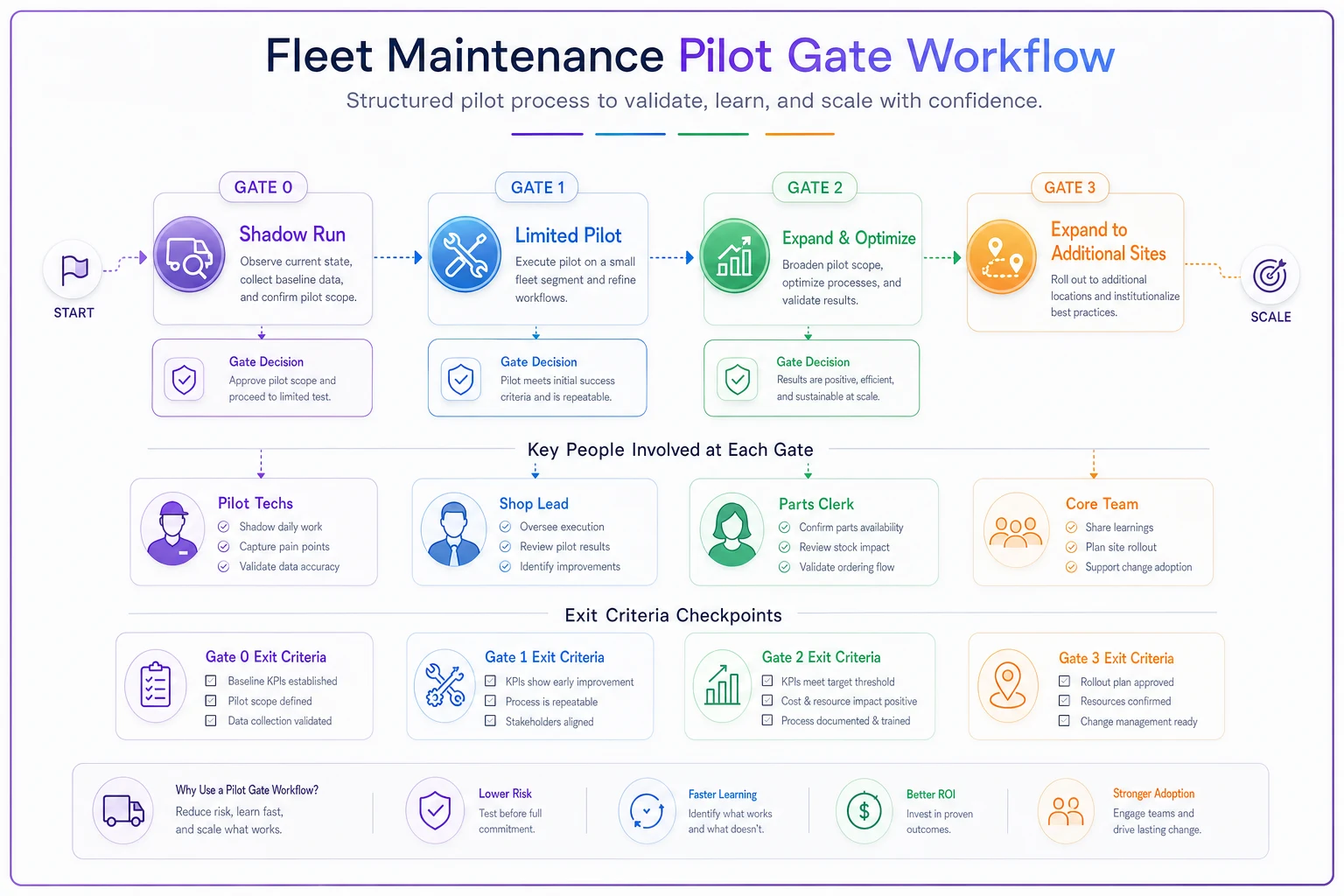
This diagram shows the gate progression and decision points so teams can visualize when to stop, fix, or expand.
Manager scripts: the conversations that actually move adoption
Training teaches buttons. Conversations change behavior. And the conversations that matter aren't the all-hands announcement — they're the short, repeated, floor-level exchanges a shop lead has every day during the transition.
Managers freeze up here because they're not sure what to say when a tech pushes back. So they say nothing, or they say "just use it, it's policy," which torches whatever goodwill was left. Give them a few scripts and the whole thing gets easier.
When a senior tech resists ("the old way was faster"): > "You're probably right that it's faster for you today. The reason we're switching isn't your speed — it's that when you're out or a new guy's on your bay, nobody can see what you saw. Walk me through where it slows you down and I'll take it straight to the people configuring it. I need you flagging the real problems, not working around them." That last line matters. You're converting a blocker into a source of fixes. The senior tech who feels heard becomes the senior tech who defends the system.
When someone's quietly keeping a shadow spreadsheet: > "I'm not going to pretend I didn't see the spreadsheet. I get why — you don't trust the new numbers yet. That's fair. Let's figure out what's wrong with the system numbers so you can throw the spreadsheet away, because right now you're doing the job twice and that's on us, not you."
When throughput dips in week one (it will): > "Yeah, we're slower this week. That's expected and it's temporary — new process always costs you before it pays you back. I'm not judging anyone's numbers this week. I'm watching whether we're getting faster each day. We are."
Daily 5-minute standup prompt for the shop lead: > "One thing that worked in the new system yesterday, one thing that got in your way. Go." That single recurring question does more for adoption than any dashboard. It surfaces friction while it's still cheap to fix, and it signals that complaints are wanted, not punished.
Run the daily 5-minute standup at the same time every day and block it on calendars so it becomes a habit rather than an optional add-on.
The pattern underneath all of these: managers should protect people during the dip, name the shadow systems out loud instead of pretending they don't exist, and route friction into fixes. Silence from a manager during a rollout reads as "this is being imposed on you," and shops respond to that exactly how you'd expect.
Adoption KPIs that survive contact with the shop floor
Vanity adoption metrics will lie to you. "Number of logins" tells you people opened the app, not that they used it instead of paper. You need metrics that detect the shadow system and measure real behavioral replacement.
The ones worth tracking:
-
Old-method residue. How many work orders, parts pulls, or inspections are still happening outside the system? This is the single most honest number. Target is a steady decline toward near-zero, not a one-time spike.
-
In-system completion rate by shift. Break it out by day/night. Night shift adoption lagging day shift by a wide margin is the earliest warning that you skipped a stakeholder.
-
Time-to-entry. How long after a job starts does it get logged? Growing lag means people are batching entries at end of shift from memory — a sign the flow doesn't fit real work.
-
Correction/rework rate on entries. High edit volume means the workflow is fighting the user.
-
Unprompted usage. Percentage of transactions that happen without a manager reminder. This is the difference between compliance and adoption.
-
Throughput and MTTR trend vs. baseline. Not to hit a target on day one — to confirm the dip recovers. If MTTR is still elevated four weeks in, the process doesn't fit and you have a design problem, not a training problem.
Pair every technical KPI with its human twin. "Pipeline uptime 99.9%" is meaningless if "in-system completion by night shift" is 40%. The system is up; nobody's using it. That's still a failed rollout — it just doesn't look like one on the infrastructure dashboard.
A real scenario: the regional delivery fleet that passed every test and still stalled
A mid-sized urban delivery operation — around 180 vehicles, two shops, roughly a dozen techs across shifts — rolled out a new telematics-to-work-order flow. Integration was clean. UAT passed. They did a one-day training and flipped the switch at both sites simultaneously.
Four weeks later the numbers told the story. Day shift at the main shop was logging maybe 70% of work in-system. Night shift was closer to 30%. The second site's parts clerk was still running his own inventory sheet and reconciling once a week. MTTR had gone up by roughly a day and a half and wasn't recovering. Leadership thought the project was done; the floor thought it was a burden IT dumped on them.
They stopped, backed up, and re-ran it as a dual-track rollout. Pilot collapsed to one bay, day shift, Gate 1. The senior tech who'd been the loudest skeptic got pulled into design — two of his complaints turned out to be legitimate workflow gaps that got fixed in the configuration. The night lead, who'd never been in a single project meeting, got his own standup and his own set of exit criteria before anyone touched his shift.
The recovery wasn't dramatic or fast. Over about two months, old-method residue dropped from everywhere to nearly nothing. Night-shift completion closed most of the gap with day shift. The parts clerk retired his spreadsheet once the system numbers reconciled cleanly three weeks running. MTTR settled back to baseline and then crept slightly below it. Same software. Same integration. The only thing that changed was running the people track as a real track with its own gates and its own conversations.
When a dual-track rollout is overkill — and when skipping it is reckless
This machinery isn't free, and not every change needs it.
When a lighter touch is fine: small configuration changes, a new report, a feature that doesn't alter anyone's daily workflow. If nobody has to change a habit, you don't need gates and scripts. Announce it, document it, move on.
When dual-track is non-negotiable: anything that replaces how techs create or close work orders, anything that changes the parts process, anything that touches multiple shifts or multiple sites, anything that threatens a long-tenured person's role as the "source of truth." The bigger the behavioral change and the more coordination points it crosses, the more the people track matters.
Who should not run this themselves: a purely technical lead with no standing on the shop floor. If the person driving adoption can't walk into the bay and have the senior tech take them seriously, the rollout needs a co-owner who can. Adoption authority is as real as technical authority, and the two rarely live in the same person.
The thing most rollout plans get backwards
The instinct is to perfect the technical build and treat adoption as cleanup. Reverse it. The technical track is the easier of the two to control — it obeys logic, tests, and deadlines. The people track is where the actual uncertainty lives, so it deserves the earlier start, the explicit gates, and the senior attention.
A maintenance IT rollout is really two deployments wearing one project name. Give each its own owner, its own definition of done, and its own clock. Gate expansion on human readiness, not just green dashboards. And measure the thing that actually tells you whether it worked: not whether the data flows, but whether the old workaround finally disappeared.
A maintenance IT rollout is really two deployments wearing one project name. Give each its own owner, its own definition of done, and its own clock. Gate expansion on human readiness, not just green dashboards. And measure the thing that actually tells you whether it worked: not whether the data flows, but whether the old workaround finally disappeared.
Ready to maximize fleet uptime and reduce maintenance costs?
Join 2,000+ fleet managers using Fleetelyly to streamline maintenance workflows and improve vehicle reliability.