



Most mobile repair routing problems don't show up on a dashboard. They show up as a tech sitting in a parking lot for 20 minutes because the part they need is back at the depot, or as two vans crossing paths across town on the same morning because dispatch assigned jobs by who was "available" rather than who was closest. The routing logic feels fine until you pull the actual GPS breadcrumbs and realize half your fleet's day is just driving.
This piece is narrow on purpose. We're going to work through the practical heuristics that make a field service fleet faster: how to cluster calls geographically, how pre-staging and pre-kitting cut the hidden delays, how to assign specialists without killing your efficiency, and when hub-and-spoke beats a fully dynamic model. And at the end, how to actually evaluate a routing pilot using response-time histograms instead of averages that lie to you.
Start with the breadcrumbs, not the schedule
Before changing any routing rule, pull two weeks of raw GPS and timestamp data and split every van's day into three buckets: driving, on-site working, and idle/waiting. Most fleets are surprised by what they find.
A typical mobile repair operation running 6–8 jobs per van per day lands somewhere around 35–45% of the workday in driving and idle combined. Not all of that is recoverable — some geography is just spread out — but a chunk of it is pure routing waste. Fleets running nearly 90+ minutes of unnecessary driving per van per day, simply because jobs were assigned first-come-first-served off the morning queue, aren't rare.
The pattern underneath it is almost always the same: dispatch optimizes for starting jobs quickly, not for total day efficiency. A call comes in, the nearest-sounding tech gets it, and nobody looks at the shape of the whole route until it's already baked.
Clustering calls: geography first, then time windows
Clustering is the single highest-leverage routing change for most fleets. The idea is simple — group jobs that are physically near each other and assign the cluster to one van, rather than scattering nearby jobs across three different techs.
Prevent costly breakdowns with proactive maintenance.
Fleetelyly helps you schedule, track, and manage every vehicle service efficiently.
- Automated maintenance reminders
- Real-time service tracking
- Parts inventory integration
No credit card required
-
Grid your service area into zones small enough that travel within a zone stays under roughly 15 minutes. For a dense urban fleet that might be 3–5 mile squares; for suburban coverage it's larger.
-
Assign each van a "home" cluster for the day based on where the heaviest call volume historically lands. Don't reassign dynamically every hour — stability matters more than it sounds like it should.
-
Let overflow spill to adjacent zones only, never across the whole map. A van covering the north cluster should take the occasional job in a neighboring zone, not get yanked downtown.
-
Batch the time windows inside the cluster. If three jobs in a zone all have "8am–noon" windows, sequence them by drive distance, not by who called first.
The mistake people make here is clustering purely by distance and ignoring time windows, or the reverse — honoring time windows so rigidly that a van zig-zags across its zone to hit arbitrary appointment slots. Distance should be the primary sort, time windows the constraint. Not the other way around.
Keep daily cluster assignments stable; frequent reassignment erases the benefits of clustering before they appear.
One more thing worth mentioning: clustering works best when your intake captures a precise location and a realistic job duration up front. Fleets that log "AC repair — 2 hours" when it's really a 45-minute recharge will cluster beautifully on paper and blow the sequence apart by 10am.
The thing most fleets miss: pre-kitting only pays off if your morning job list is stable. If you're reshuffling assignments at 7am, the stager kitted for the wrong van. Pre-kitting and clustering stability reinforce each other — you can't do one well without the other.
Pre-staging and pre-kitting: the delays that don't look like routing problems
Routing software alone won't fix this one. A perfectly optimized route still collapses if the tech arrives without the right parts. Those delays masquerade as route inefficiency when they're actually a staging problem.
Pre-kitting means assembling the parts, consumables, and tools for a specific set of jobs before the van leaves, rather than hoping the van's general stock covers whatever comes up. The win is eliminating the mid-day depot run — which is the most expensive drive of the day because it's usually a round trip through traffic to grab one $12 part.
In practice, this usually breaks down when a van carries a broad "just in case" inventory but still hits the 10–15% of jobs that need something non-standard. Those jobs trigger either a return trip or a reschedule, and both wreck the day's cluster.
-
The night before, dispatch locks the next day's job list per van by a cutoff time (say 6pm).
-
A stager pulls kits against each confirmed job — not against the van's generic loadout.
-
Jobs that can't be fully kitted (missing part, unclear diagnosis) get flagged and either rescheduled or sequenced last, so a parts gap doesn't strand a van mid-cluster.
-
The van's standing inventory covers only the genuinely common, high-frequency SKUs.
This ties directly into how you define your recurring kits. If you haven't formalized kit definitions and replenishment, pre-kitting falls apart within a week because nobody actually agrees on what "the AC kit" contains.
The thing most fleets miss: pre-kitting only pays off if your morning job list is stable. If you're reshuffling assignments at 7am, the stager kitted for the wrong van. Pre-kitting and clustering stability reinforce each other — you can't do one well without the other.
The diagram below summarizes the pre-kitting staging workflow.
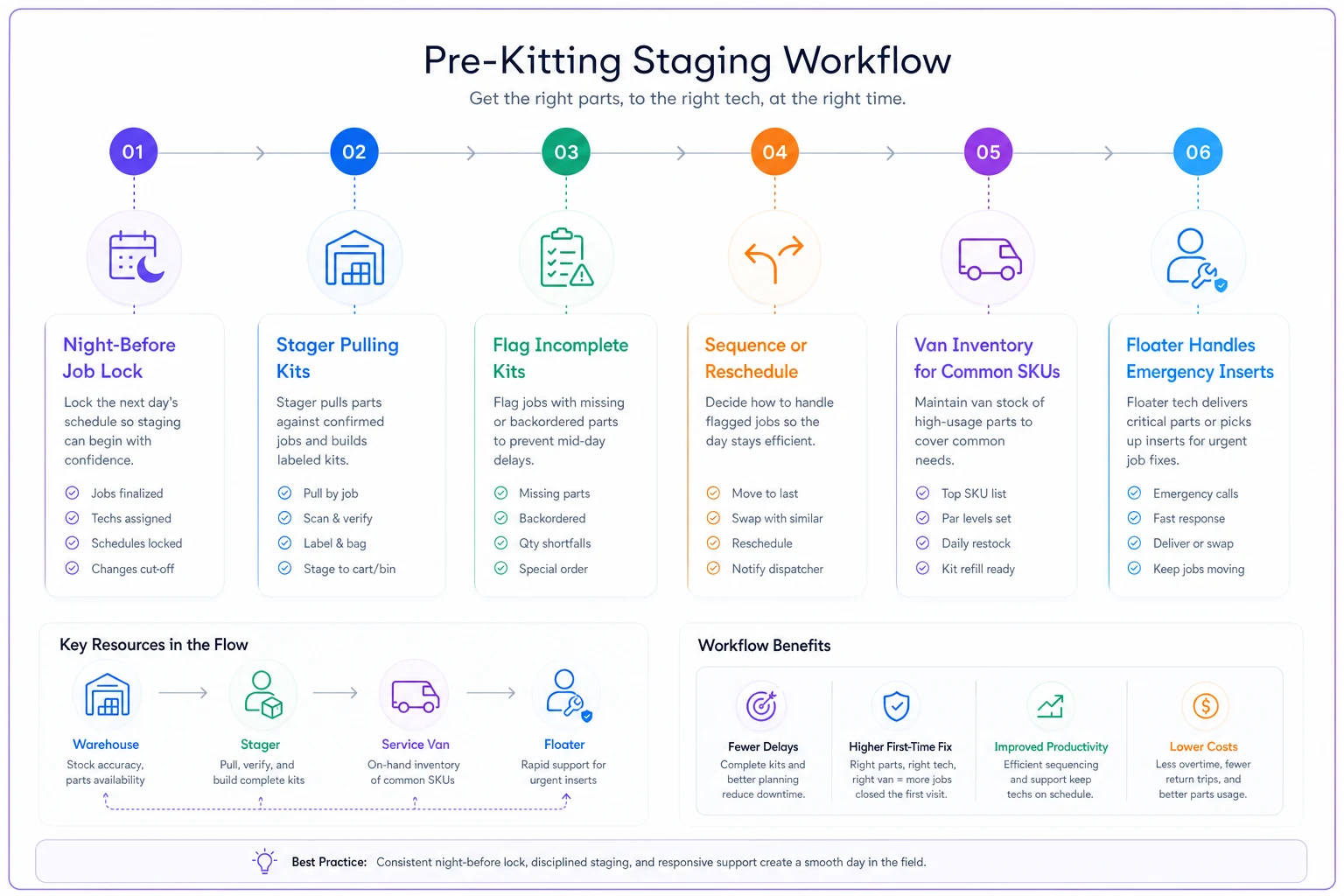
Pre-kitting and clustering stability reinforce each other — visualizing the handoffs makes the operational steps easier to train and audit.
Specialist assignment without wrecking efficiency
Mixed fleets have a tension built in: your best diesel tech, your EV-certified tech, and your HVAC specialist each handle jobs the others can't — but routing by specialty pulls against routing by geography. Send the EV specialist across town for one job and you've just torched the efficiency you built with clustering.
The heuristic that balances this:
-
Tier your jobs by skill requirement. Most calls are "any qualified tech." A minority need a specific certification. Route the general jobs by cluster, and treat specialist jobs as a separate overlay.
-
Give specialists a cluster anchored near their expected specialist-call density. If 70% of EV jobs cluster in two zones, home-base the EV tech there and let them absorb general jobs in those zones too.
-
Batch specialist calls into runs. Rather than dispatching the specialist reactively, hold non-urgent specialist jobs and sequence them into an efficient run once or twice a week where volume allows.
-
Cross-train toward the edges. You don't need everyone certified on everything, but having two techs who can handle the second-most-common specialist job removes a lot of routing rigidity.
This overlaps directly with how you build shift coverage. The logic in our write-up on technician shift scheduling and cross-skilling applies here — routing flexibility is downstream of how deep your skill bench is. A fleet where only one person can touch EV work will always have routing distorted around that single constraint.
The mistake to avoid: assigning specialists to every job in their specialty regardless of location "because they're the expert." A 50-minute drive for a 30-minute job that a nearby cross-trained tech could handle is a net loss, even if the specialist does it slightly better.
Dynamic routing vs hub-and-spoke: the actual tradeoff
A lot of fleets over-engineer this decision. There's a pull toward fully dynamic, re-optimize-on-every-event routing because it sounds optimal. Sometimes it is. Often it creates chaos that costs more than the gains.
| Factor | Hub-and-spoke | Dynamic routing |
|---|---|---|
| Parts staging | Easy — kit from central hub | Hard — jobs change after staging |
| Response-time consistency | Predictable | Variable |
| Handles emergency inserts | Poorly — disrupts fixed routes | Well — reoptimizes on the fly |
| Tech familiarity | High — same zones daily | Low — different area each day |
| Dispatch overhead | Low | High — needs good tooling |
| Best for | Scheduled/PM-heavy work | High emergency/breakdown mix |
Hub-and-spoke means vans run out from a central depot, work assigned zones, and return. It's predictable, it makes pre-kitting trivial, and techs get familiar with their territory. The weakness is that it absorbs emergency inserts badly — a breakdown call mid-day forces you to either break a route or make a van backtrack.
Dynamic routing continuously reassigns based on live conditions. It genuinely shines when a large share of your volume is unpredictable breakdowns where response time is the whole product. But it fights pre-kitting, it burns dispatch attention, and it quietly erodes tech familiarity with any given area.
When hub-and-spoke actually makes sense
-
Your work is mostly scheduled PM and planned repairs, not emergencies.
-
Parts kitting is a bottleneck and you need staging stability.
-
Your service area has clear geographic density you can carve into stable zones.
When dynamic routing makes sense
-
A high share of calls are urgent breakdowns with tight response-time SLAs.
-
Job durations and locations are genuinely unpredictable day to day.
-
You have dispatch tooling good enough that re-optimizing doesn't eat an hour of someone's attention per shift.
Who should NOT go fully dynamic
Small fleets — roughly under 8–10 vans — usually get hurt by full dynamic routing. The optimization gains are marginal at that scale, and the loss of staging predictability and territory familiarity costs more than the saved windshield time. A hybrid almost always wins here: hub-and-spoke as the backbone, with a reserved "floater" van or defined slack capacity to absorb emergency inserts without blowing up the clustered routes.
That hybrid also connects to how you triage incoming alerts. If your telematics feed is well-tuned, you can decide which breakdown calls genuinely need an immediate dynamic insert versus which can be sequenced into tomorrow's cluster. Our breakdown of mapping fault codes to immediate, scheduled, or monitor work orders is essentially the front door to this decision — not every "urgent" alert deserves to disrupt a route.
A real scenario
A mid-size mobile repair operation running equipment service — about 11 vans, mixed scheduled and breakdown work — was dispatching almost entirely reactively. Nearest-available tech gets the call, specialists dispatched the moment their specialty came in, no pre-kitting.
Their numbers before: roughly 5.5 completed jobs per van per day, with drive-plus-idle time hovering around 40% of the shift. Mid-day depot runs for parts were happening somewhere around 8–10 times a week across the fleet — each one killing an afternoon's sequence.
-
Gridded the service area into stable daily clusters, with overflow allowed only to adjacent zones.
-
Locked the next-day job list at 6pm and pre-kitted against confirmed jobs.
-
Kept one van as a designated floater for emergency inserts so the other routes stayed intact.
After about six weeks, completed jobs per van moved to roughly 6.5–7 per day. Mid-day depot runs dropped to a couple per week. Nothing dramatic happened to any single metric overnight — it was more that the days stopped falling apart by mid-afternoon. The floater van absorbed the emergencies that used to detonate three other routes.
They did not go fully dynamic. At 11 vans, the hybrid gave them most of the benefit without the dispatch overhead.
Evaluating the pilot: histograms, not averages
This is the part most teams skip, and it's where routing pilots get judged wrong. If you measure a routing change by average response time, you'll miss what actually matters. Averages hide the tail, and the tail — the worst 10% of response times — is usually what generates the angry customer calls and the SLA breaches.
Instead, build a response-time histogram before and after the pilot. Bucket your response times (say, 0–30 min, 30–60, 60–90, 90–120, 120+) and compare the shape of the distribution, not just the center.
What to actually look for:
-
Did the right tail shrink? The number of jobs in the 120+ bucket matters more than the average. A pilot that cuts your worst-case responses is often more valuable than one that nudges the median.
-
Did the distribution get tighter? Consistency is a feature. A fleet whose responses cluster in a narrow band is easier to promise against than one with a wide spread, even at the same average.
-
Watch for bimodal shapes. If you see two humps — a fast cluster and a slow cluster — that usually means two different job types or two different route structures are hiding in one dataset. Split them and analyze separately.
-
Segment by job type. Scheduled and emergency jobs have completely different response-time profiles. Mixing them in one histogram will mislead you every time.
A simple pilot evaluation process:
-
Pull 3–4 weeks of baseline response times, segmented by job type.
-
Run the routing change on part of the fleet or part of the service area — not everything, so you have a comparison group.
-
Pull the same window post-change and overlay the histograms.
-
Judge success by tail reduction and distribution tightness first, average second.
-
Check the operational side effects — did pre-kitting staging time blow up, did the floater van sit idle too often — before declaring a win.
Worth holding onto: a routing change can improve your average while making your worst days worse. Only the distribution tells you that. If you're only watching the mean, you can ship a "successful" pilot that your customers experience as less reliable.
Where to start
Pull the GPS breadcrumbs first. Split the day into driving, working, and idle, then build one baseline histogram of your response times segmented by job type. That alone usually surfaces the two or three routing habits quietly costing you an hour per van per day.
Then layer the changes in order — clustering first because it's the biggest lever, pre-kitting second because it protects the clusters, specialist overlays third. Only consider dynamic routing if your emergency volume genuinely demands it. Most mobile repair fleets don't need the complex solution. They need stable clusters, kitted vans, and one honest histogram telling them whether it actually worked.
Ready to maximize fleet uptime and reduce maintenance costs?
Join 2,000+ fleet managers using Fleetelyly to streamline maintenance workflows and improve vehicle reliability.