


The scary part about telematics security isn't some dramatic hack. It's the boring stuff. A telematics gateway shipping with the same admin password across your whole fleet. An API key that ended up in a Slack message two years ago and never got rotated. A work-order system that trusts every fault code it receives without questioning where it came from.
The telematics-to-work-order pipeline is one of the softest targets in a maintenance operation because it gets built for convenience, not defense. Data flows one direction, everyone's happy it works, and nobody circles back to lock it down. Then a diagnostic feed gets spoofed, or a vendor credential leaks, and suddenly your shop is dispatching phantom repairs — or someone has a foothold into your fleet management platform.
This isn't a general "cybersecurity matters" piece. It's a remediation roadmap for the specific flow: device → transport → auth → work order. I'll cover it in the order you should actually fix things, because prioritization matters more than completeness. You can't harden everything at once.
Start where the attacker starts: the device layer
Almost every telematics breach postmortem traces back to something physical or firmware-level that got ignored. The device sits in a vehicle that parks in public lots, gets serviced by third parties, and sometimes gets swapped between trucks without anyone updating an asset record.
The most common exposure is embarrassingly simple: default or shared credentials on the telematics control unit or gateway. A fleet buys 80 units, they all ship with admin/admin or a vendor default, and nobody changes them because the units "just work." One compromised device becomes a template for compromising all of them.
Device-level hardening, in the order I'd tackle it:
-
Kill default credentials immediately and use per-device unique passwords or certificates, not a fleet-wide shared secret
-
Disable unused interfaces — debug ports, unused cellular APN configs, Bluetooth pairing modes left in discoverable state
-
Lock down firmware update channels so updates only accept signed images from your vendor, never unsigned OTA pushes
-
Enforce mutual TLS between device and backend so a rogue device can't impersonate a legitimate one, and a rogue backend can't harvest your data
-
Maintain a device inventory tied to VIN and install date — you can't secure hardware you don't know exists
-
Set a firmware version floor and flag any device running below it for update during the next PM cycle
That last point is where maintenance teams actually have an advantage. You already touch these vehicles on a schedule. Firmware review can ride along with existing PM workflow instead of becoming a separate security project nobody has time for.
One pattern worth calling out: the "temporary" test device. Someone throws a spare telematics unit on a bench with wide-open config to debug an integration, and it stays connected to production for months. Those are the units that end up in breach reports.
The pipeline: stop trusting data just because it arrived
Once data leaves the device, the next weak point is the transport and ingestion layer. The mistake here usually isn't a lack of encryption — most vendors do TLS in transit now. The mistake is trusting the contents of the message without verifying the source or the shape.
Prevent costly breakdowns with proactive maintenance.
Fleetelyly helps you schedule, track, and manage every vehicle service efficiently.
- Automated maintenance reminders
- Real-time service tracking
- Parts inventory integration
No credit card required
In real operations, this happens when a fleet stitches together a telematics feed and a work-order system with a quick integration, and the receiving end accepts whatever comes through. No signature check. No schema validation. If a fault-code payload arrives claiming a critical engine fault, a work order gets created. Nobody asks whether the payload is authentic or malformed.
This ties directly into how integrations tend to fail in the first place. If you haven't defined a strict contract for what a valid telematics event looks like, you've got no way to reject a bad one. The security version is the same discipline with an adversary in mind — I've gone deep on the contract side of this in why most fleet maintenance integrations fail.
Secure-pipeline priorities:
-
Terminate TLS properly and reject anything that isn't — no fallback to plaintext "for testing"
-
Validate every payload against a schema before it touches business logic; malformed or unexpected fields get quarantined, not processed
-
Sign events at the source where the platform supports it, so the work-order system can verify the telematics backend actually sent it
-
Rate-limit ingestion per device so a single compromised unit can't flood you with thousands of fake fault codes
-
Separate ingestion from action — data comes in, gets validated, and only then gets promoted into work-order creation, never in one uninterrupted step
That fifth point is the one that saves you. If ingestion and work-order creation are the same pipeline with no gate between them, a bad feed goes straight to the shop floor. Put a validation stage in the middle and most spoofing attempts die there.
Here's a quick visual of the secure pipeline workflow.
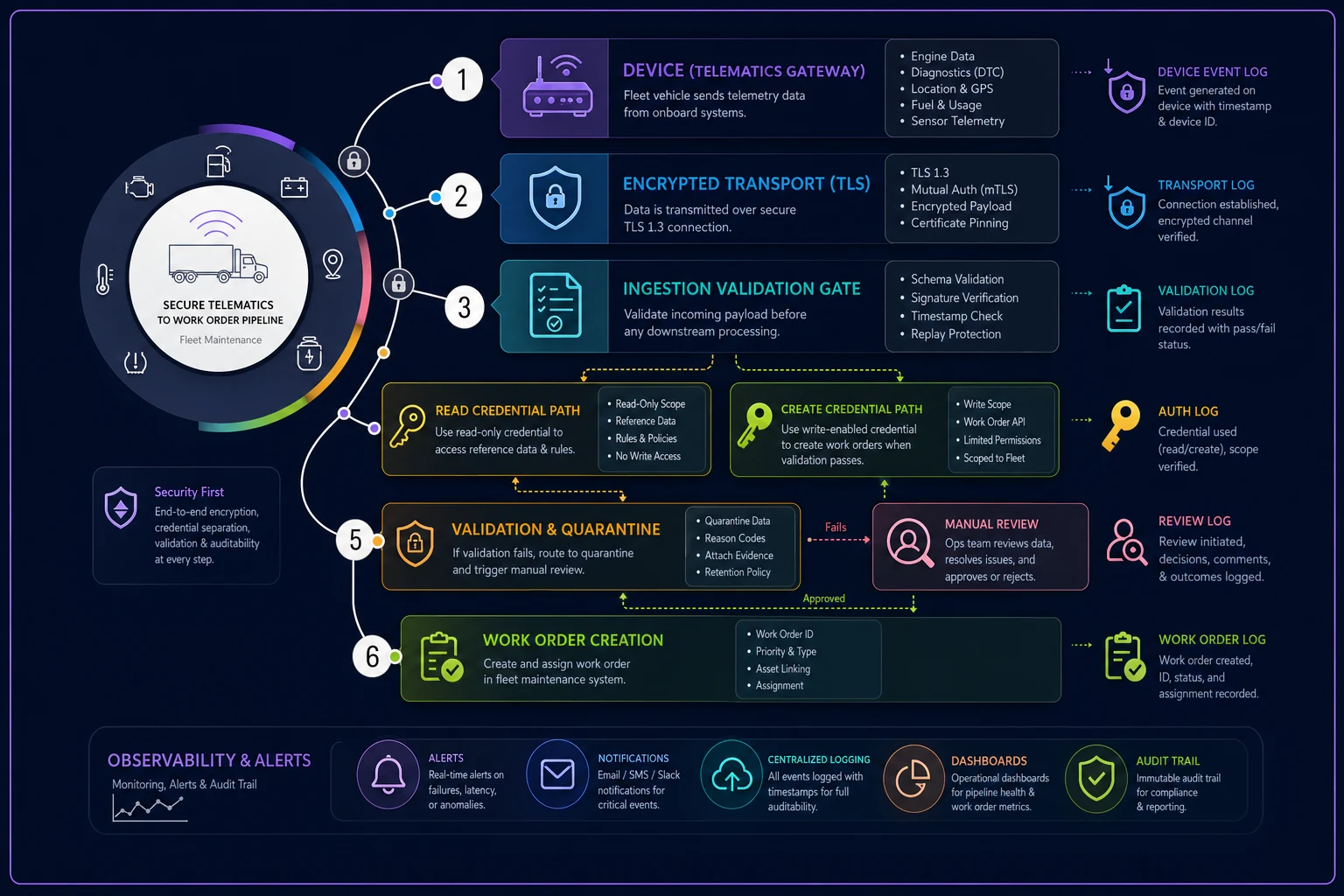
If ingestion and work-order creation are the same pipeline with no gate between them, a bad feed goes straight to the shop floor. Put a validation stage in the middle and most spoofing attempts die there.
Access controls and auth: the part everyone gets lazy about
This is where most fleets are genuinely exposed, and it's not glamorous. It's credential sprawl. API keys shared across integrations. Service accounts with far more permission than they need. A single "integration user" that can read telematics data, create work orders, edit parts inventory, and pull driver PII — all because it was easier to grant everything than to scope it properly.
A typical setup looks like this: one API token the telematics platform uses to push into the maintenance system. That token has write access to the entire work-order module. It's stored in a config file on a server a few IT admins can reach. It hasn't been rotated since the integration went live. If that token leaks, an attacker can create, modify, and close work orders at will — and impersonate the whole telematics feed.
| Access pattern | Common (weak) setup | Hardened setup |
|---|---|---|
| Telematics → work order | One token, full write access, never rotated | Scoped token, create-only on work orders, 90-day rotation |
| Human maintenance staff | Shared login for the shop terminal | Individual accounts, role-based, MFA on admin roles |
| Vendor / integrator access | Standing admin account | Time-boxed access, granted per task, auto-expires |
| Reporting / analytics pulls | Same credential as the write path | Separate read-only credential |
MFA on administrative accounts is non-negotiable and it's cheap.
The single biggest quick win for most fleets is splitting the read path from the write path. Dashboards, reports, and analytics almost never need write access, but they usually share a credential with something that does. Split them and you shrink the blast radius of a leaked reporting key to basically nothing.
MFA on administrative accounts is non-negotiable and it's cheap. The friction is real but small, and the accounts that manage device config or user permissions are exactly the ones an attacker wants.
Logging and alerting: catch it in the flow, not in the postmortem
You can't respond to what you can't see. The problem is that fleets already drown in telematics noise, so adding security logging on top feels like adding to the pile. The trick is logging the right events at the right boundaries — not everything everywhere.
Focus logging on the transitions in the pipeline, the points where data changes hands or gains authority:
-
Authentication attempts against the telematics backend and the work-order API (successes and failures both)
-
Any credential or token creation, rotation, or permission change
-
Payloads that failed schema validation and got quarantined
-
Work orders created directly from telematics events, tagged as auto-generated
-
Firmware update events and any device that reconnected after being offline for an unusual stretch
Then set alerts that key off patterns a normal day wouldn't produce. A device suddenly emitting fault codes at 50x its usual rate. A batch of work orders created from a single device in a two-minute window. An API key authenticating from a new IP range at 3am. Failed auth attempts climbing against an admin account.
There's an important overlap here with alert quality generally. If your telematics feed is already noisy with false positives, security alerts drown in the same mess and everyone learns to ignore the dashboard. Cleaning up baseline noise is a prerequisite — I covered the tuning side of that in the audit-and-tuning playbook for false telematics alerts. A tuned feed makes anomalies visible. A noisy one buries them.
One pattern worth watching: attackers who understand your system don't spike — they trickle. A slow, steady stream of plausible-but-fake work orders is harder to catch than a flood. That's why volume-per-device baselines matter more than absolute thresholds.
Incident response for the telematics→work-order flow specifically
Generic incident-response plans don't help when the actual incident is "our diagnostic feed might be lying to us." You need steps scoped to this exact flow, decided in advance, because the middle of an incident is a bad time to figure out who can revoke a token.
A workable response sequence when you suspect the telematics-to-work-order path is compromised:
-
Contain the pipeline, not the whole fleet. Switch auto-work-order creation to manual review mode so incoming events get queued instead of acted on. This stops the bleeding without grounding trucks.
-
Rotate the suspected credentials immediately — the telematics integration token first, then any admin accounts touched in the window.
-
Isolate suspect devices. Any unit showing anomalous behavior gets flagged for physical inspection and pulled from the trusted device list until verified.
-
Audit the work orders created during the suspect window. Look for repairs that don't match vehicle history, duplicate orders, or fault codes inconsistent with the vehicle's actual telemetry.
-
Verify firmware integrity on affected devices against known-good signed versions.
-
Restore trusted flow gradually — bring auto-creation back online for verified devices first, keep the rest in manual review until cleared.
-
Write the timeline down while it's fresh and feed it back into your validation rules so the same vector gets caught automatically next time.
The step people skip is number one. The instinct in a real incident is to shut everything off, which grounds vehicles and creates a maintenance backlog that costs more than the breach might have. Switching to manual-review mode keeps operations moving while you investigate. That single design choice — the ability to degrade to manual instead of failing hard — is worth building in before you ever need it.
A real scenario
A regional service fleet running around 60 vehicles had a telematics feed wired straight into their maintenance system. Single API token, full write access, no schema validation on incoming payloads. It worked fine for two years.
Then the shop started seeing work orders that didn't add up — repairs flagged for vehicles that weren't due, fault codes that didn't match what techs found on inspection. Somewhere between 15 and 20 questionable orders over a couple of weeks. Not a dramatic flood, just enough wasted diagnostic time to notice. Turned out a misconfigured test integration was re-injecting stale and malformed events into the production feed, and because nothing validated the payloads, every one became a work order.
The remediation wasn't exotic. They added schema validation at ingestion, split the token into a create-only write credential and a separate read-only reporting credential, put a validation gate between ingestion and work-order creation, and set an alert on per-device event volume. Malformed events started getting quarantined instead of processed. Wasted diagnostic time on phantom orders dropped off, and they finally had a log trail showing where events actually came from.
Cost of the fix was a few days of engineering and config work. Cost of the previous setup was a slow, steady drain of tech hours chasing repairs that were never real — nobody had connected it back to the integration until they went looking.
Where to actually start
If this whole list feels like too much, don't try to do it all at once. Kill default and shared credentials on devices first — it's the highest-impact, lowest-effort move and closes the most common attack path. Second, split your read and write credentials, because that shrinks the damage of any future leak significantly. Third, put a validation gate between ingestion and work-order creation.
-
Kill default and shared credentials on devices first — it's the highest-impact, lowest-effort move and closes the most common attack path
-
Second, split your read and write credentials, because that shrinks the damage of any future leak significantly
-
Third, put a validation gate between ingestion and work-order creation
Those three cover most of your real risk and none of them require a big project. Device inventory, firmware floors, and the full incident-response playbook can follow on your normal maintenance cadence.
The uncomfortable truth about telematics security is that the pipeline was almost always built to work, not to doubt. Every event gets trusted, every credential gets shared, every convenience gets kept. Hardening it is mostly a matter of adding skepticism back in at the right boundaries — verify the device, validate the payload, scope the access, watch the transitions. Do that in order and you close the gaps that actually get exploited, without turning your shop into a security bottleneck.
Ready to maximize fleet uptime and reduce maintenance costs?
Join 2,000+ fleet managers using Fleetelyly to streamline maintenance workflows and improve vehicle reliability.