

Fleet maintenance integrations break in predictable ways. Not because the software is bad, but because nobody defines what "vehicle ready" actually means between systems.
A 400-truck logistics company spent $180k on integration consultants. Six months later, their dispatch system still showed trucks as "available" while the maintenance platform had them flagged for critical brake work. The integration was technically working — data flowed fine between systems. But nobody had defined what maintenance status actually meant for dispatch decisions.
This disconnect kills fleets. Your telematics throws fault codes, your maintenance software schedules repairs, your dispatch system assigns routes, and your accounting tracks costs. Each system has its own version of truth about vehicle status, and they're all technically correct within their own context.
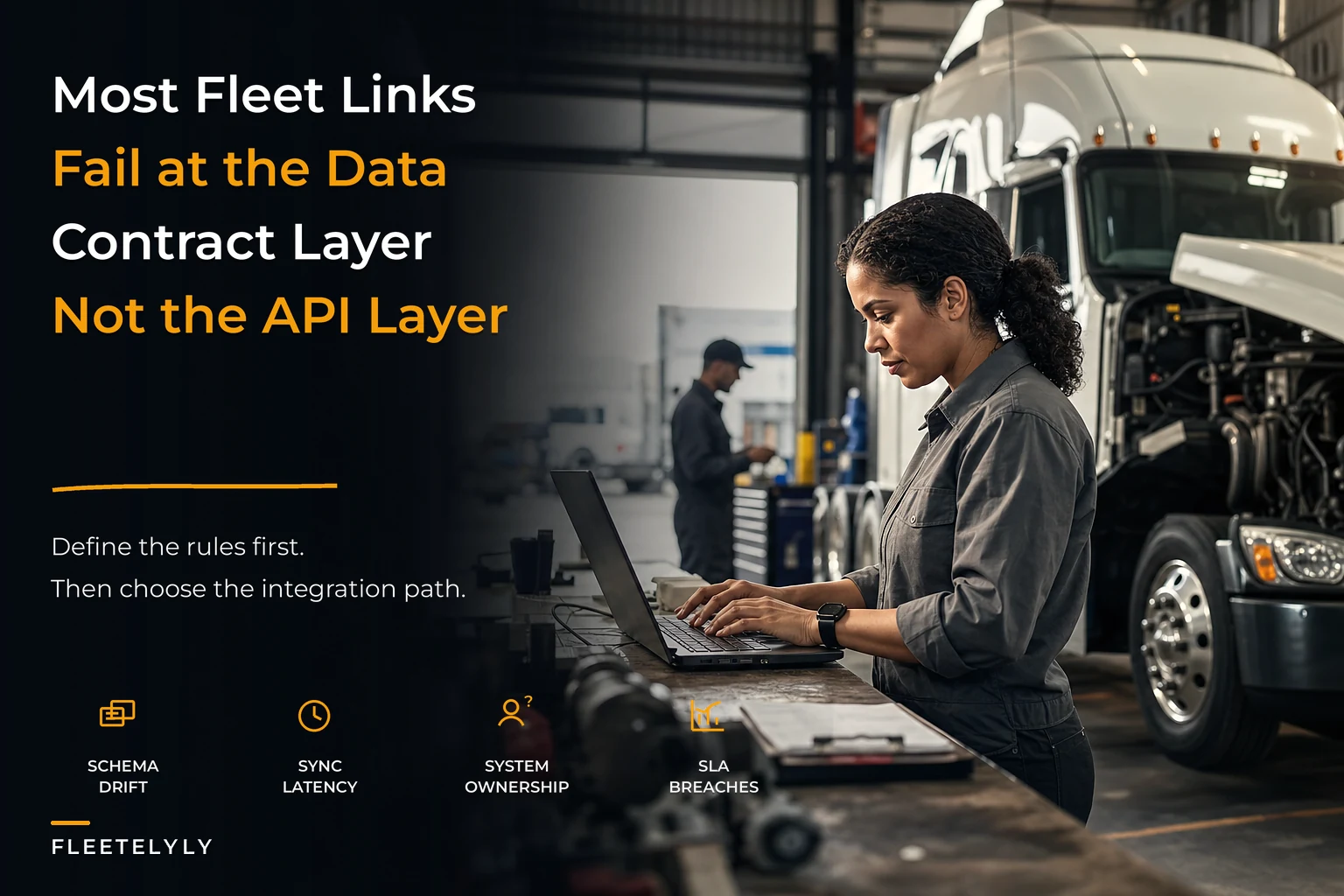
The real problem isn't connecting these systems. It's defining what the data means when it moves between them.
Three integration patterns that actually work (and when each one breaks)
Most fleet maintenance integrations follow one of three patterns: Change Data Capture (CDC), traditional APIs, or event-driven messaging. Each has specific failure modes that tend to surface around 20-30 vehicles if you haven't planned ahead.
Change Data Capture: When you need the full history
CDC tracks every change to your maintenance records as it happens — think of it like a security camera for your data. You can rewind and see exactly what changed and when.
A municipal fleet running 85 vehicles uses CDC to sync their maintenance system with financial reporting. Every parts order, labor hour, and warranty claim gets captured with full audit trails. When the CFO asks why maintenance costs jumped 23% last quarter, they can trace every transaction back to the source.
But CDC breaks when systems define "change" differently. Your maintenance platform might update a work order status from "scheduled" to "in progress" to "completed." Your dispatch system only cares about "available" or "not available." Without translation rules, you're just capturing noise.
The bandwidth requirements also scale poorly. A 50-vehicle fleet generates roughly 8,000 change events per month during normal operations. During busy periods — spring PM schedules, weather events, recall campaigns — that number can triple. Most mid-sized fleets haven't provisioned for those spikes.
REST APIs: Simple until they aren't
API integrations feel natural because they work like any other web service. Your dispatch system asks "Is truck #47 available?" and the maintenance system responds with current status.
The simplicity hides a coordination problem. APIs are request-response — one system asks, another answers. But fleet operations rarely work that way. When a technician discovers frame damage during routine service, multiple systems need that information immediately: dispatch needs to reassign routes, customer service needs delivery updates, finance needs CAPEX approval workflows.
With APIs, each system has to poll for changes or wait to be asked. A beverage distributor with 120 delivery trucks lost around $67k in missed deliveries because their dispatch system only checked vehicle status every 4 hours. Trucks sat idle while drivers waited for assignments that never came.
Rate limits compound the problem. Most maintenance platforms cap requests somewhere between 1,000 and 5,000 per hour. That sounds like plenty until you're tracking 200 vehicles across 8 integrated systems, each checking status every few minutes.
Event-driven: Real-time with real complexity
Event-driven architectures broadcast changes as they happen. Technician closes a work order? Every subscribed system gets notified immediately.
This matches how fleet operations actually work — changes ripple through multiple departments at once. A refrigeration unit failure doesn't just trigger maintenance; it affects route planning, customer notifications, and insurance claims.
The challenge is defining which events matter to which systems. Your telematics generates hundreds of fault codes daily. Most are informational. Some require immediate action. Others accumulate until they hit maintenance thresholds.
Without clear event contracts, systems either miss critical updates or drown in noise. A food service fleet learned this the hard way after their event bus delivered 14,000 messages per day to their dispatch system. Dispatchers started ignoring all maintenance alerts — including the critical ones.
Contract-level SLAs that prevent midnight integration failures
Integration contracts need three components most teams skip: semantic definitions, timing guarantees, and fallback behaviors.
Prevent costly breakdowns with proactive maintenance.
Fleetelyly helps you schedule, track, and manage every vehicle service efficiently.
- Automated maintenance reminders
- Real-time service tracking
- Parts inventory integration
No credit card required
Define what fields actually mean
"Odometer reading" seems obvious until you realize different systems capture it differently:
-
Telematics
Real-time from ECM
-
Fuel cards
At fill-up
-
Maintenance
At shop check-in
-
Driver logs
End of shift
A concrete haul fleet found their PM schedules were off by 2,000-3,000 miles per vehicle because their integration used fuel card odometer readings (captured every 3-4 days) while their maintenance system expected daily updates.
Your contract should specify:
-
Source of truth
Which system owns each data element
-
Update frequency
How often values refresh
-
Precision requirements
Exact vs approximate values
-
Null handling
What missing data means
Timing guarantees beyond "real-time"
"Real-time" is meaningless without specifics. Define exact timing requirements:
| Event Type | Maximum Latency | Retry Policy | Timeout Behavior |
|---|---|---|---|
| Safety critical (brake failure) | 30 seconds | 3 attempts, exponential backoff | Create manual alert |
| Operational (PM due) | 5 minutes | 5 attempts over 1 hour | Queue for batch processing |
| Administrative (cost updates) | 1 hour | Daily reconciliation | Include in exception report |
| Historical (reporting data) | 24 hours | Weekly full sync | Flag in data quality dashboard |
A regional trucking company running 340 vehicles defined these SLAs after their previous "real-time" integration left 12 trucks with overdue DOT inspections. The integration was technically working — just running 6 hours behind during peak periods.
Fallback behaviors when systems disagree
Systems will disagree. Your maintenance platform shows a vehicle available, telematics shows an active fault code, and dispatch already assigned it to a route. Who wins?
-
Safety always overrides operations
-
More recent data overrides older data (with timestamp proof)
-
Human input overrides automation (with audit trail)
-
Conservative interpretation for compliance items
Document what happens during partial failures. If maintenance history syncs but current status fails, can the vehicle still be dispatched? Most fleets don't figure this out until it's 2 AM with drivers waiting.
Failure modes hiding in your integration
Every integration pattern fails in specific ways. Knowing these patterns lets you build monitors before problems cascade.
CDC failure: The replay problem
CDC systems maintain a log of every change. When connections drop, they replay missed changes on reconnect. Sounds foolproof until you hit replay storms.
A utility fleet with 180 vehicles had their CDC connection drop for 3 hours during system maintenance. When it came back online, 4,000 queued changes flooded their dispatch system. The replay included intermediate states and final states — work orders showed as scheduled, started, paused, resumed, and completed in rapid sequence. Their dispatch system assigned and unassigned the same vehicles dozens of times, creating chaos in the morning rush.
-
Compress intermediate states (only replay final status)
-
Rate-limit replay speed
-
Validate business logic during replay (don't dispatch vehicles currently in the shop)
-
Mark replayed data vs live data
API failure: The timeout cascade
API timeouts trigger retry storms that make the original problem worse. Your dispatch system calls maintenance status, times out after 5 seconds, retries immediately. Meanwhile the maintenance system is still processing the first request.
Now you have duplicate requests stacking up. The maintenance system slows under load. More timeouts, more retries. A parts distributor's fleet went down for 8 hours when their 95-vehicle integration triggered 48,000 retry requests in 15 minutes.
-
After 3 failures
Switch to cached data
-
After 10 failures
Stop retrying, alert operators
-
Check health endpoint before resuming
-
Use exponential backoff (wait 1, 2, 4, 8... seconds between retries)
Event failure: The phantom update loop
Event systems can create update loops where systems endlessly notify each other about the same change. Maintenance system updates vehicle status → triggers dispatch system → which updates route plans → which triggers maintenance system to update availability windows → which triggers dispatch system again.
A waste management fleet hit this with 230 vehicles generating 85,000 events per hour. Each collection truck status change triggered route optimization, which triggered maintenance window updates, which triggered more route changes.
-
Event versioning (ignore events you triggered)
-
Idempotency keys (recognize duplicate events)
-
Change detection (only fire events when data actually changes)
-
Event attribution (track which system initiated the change)
A waste management fleet hit this with 230 vehicles generating 85,000 events per hour.
Sample schemas that won't break at scale
Here's what actually works for small-to-medium fleets in the 50-500 vehicle range.
Vehicle status schema
{ "vehicleid": "TRK-2847", "statusversion": "2.1", "operationalstatus": { "availablefordispatch": false, "reasoncode": "MAINTENANCECRITICAL", "estimatedreturn": "2024-11-28T14:00:00Z", "confidence": 0.85 }, "maintenancestatus": { "currentlocation": "SHOPBAY3", "workorderids": ["WO-8834", "WO-8835"], "criticalflags": ["DOTINSPECTIONDUE"], "pmcompliance": 0.94 }, "sourcesystems": { "primary": "maintenanceplatform", "lastupdated": "2024-11-27T09:43:22Z", "conflictresolution": "most_restrictive" } }
The key field here is conflict_resolution. When systems disagree, you need pre-defined rules. "Most restrictive" means safety wins over operations — always.
Work order event schema
{ "eventid": "evt7733829", "eventtype": "workorder.statuschange", "timestamp": "2024-11-27T10:15:33Z", "vehicleid": "TRK-2847", "workorder": { "id": "WO-8834", "previousstatus": "scheduled", "newstatus": "inprogress", "estimatedcompletion": "2024-11-27T16:00:00Z", "affectsavailability": true, "downstreamimpacts": ["dispatch", "customernotification"] }, "metadata": { "sourcesystem": "maintenanceplatform", "eventversion": "1.0", "correlationid": "corr445", "idempotencykey": "WO-8834-status-in_progress" } }
The downstream_impacts field tells consuming systems whether they need to act. Not every maintenance event affects dispatch — this keeps systems from processing events that don't concern them.
Your 90-day middleware roadmap
Most fleets try to integrate everything at once. That's how you end up with half-working connections everywhere and reliable data nowhere.
Days 1-30: Foundation
Start with one critical integration. Usually maintenance-to-dispatch or maintenance-to-telematics — whichever is causing the most daily friction.
Set up basic monitoring across four metrics: message delivery rates, error rates by type, latency percentiles (p50, p95, p99), and business metric correlation (vehicles dispatched vs available). You don't need a dashboard for all of this on day one — just make sure you can pull the numbers when something breaks.
A moving company with 67 trucks started with maintenance-to-dispatch only. That single integration reduced their "surprise unavailable" trucks from 8-10 per week down to 1-2.
Days 31-60: Bidirectional flow
Add the reverse flow. If you started with maintenance→dispatch, now add dispatch→maintenance so planned routes affect PM scheduling.
This is where most semantic mismatches surface. Dispatch thinks in routes and hours. Maintenance thinks in miles and calendar days. Building the translation logic here prevents bigger problems later.
Add failure handling in this phase: dead letter queues for failed messages, reconciliation jobs for missed updates, and manual override workflows for edge cases your rules don't cover.
Days 61-90: Multi-system orchestration
Connect the third system — usually accounting or customer service. Now you're dealing with chain reactions: maintenance completes → vehicle available → dispatch assigns → customer gets notified → accounting updates.
Build orchestration logic with clear transaction boundaries (what must succeed together), compensation logic (how to roll back partial updates), and saga patterns for long-running workflows.
Spend most of your time on the unhappy paths. What happens when maintenance completes work, dispatch assigns the vehicle, but customer notification fails? Most integrations fall apart exactly here.
This visual outlines the 90-day roadmap.
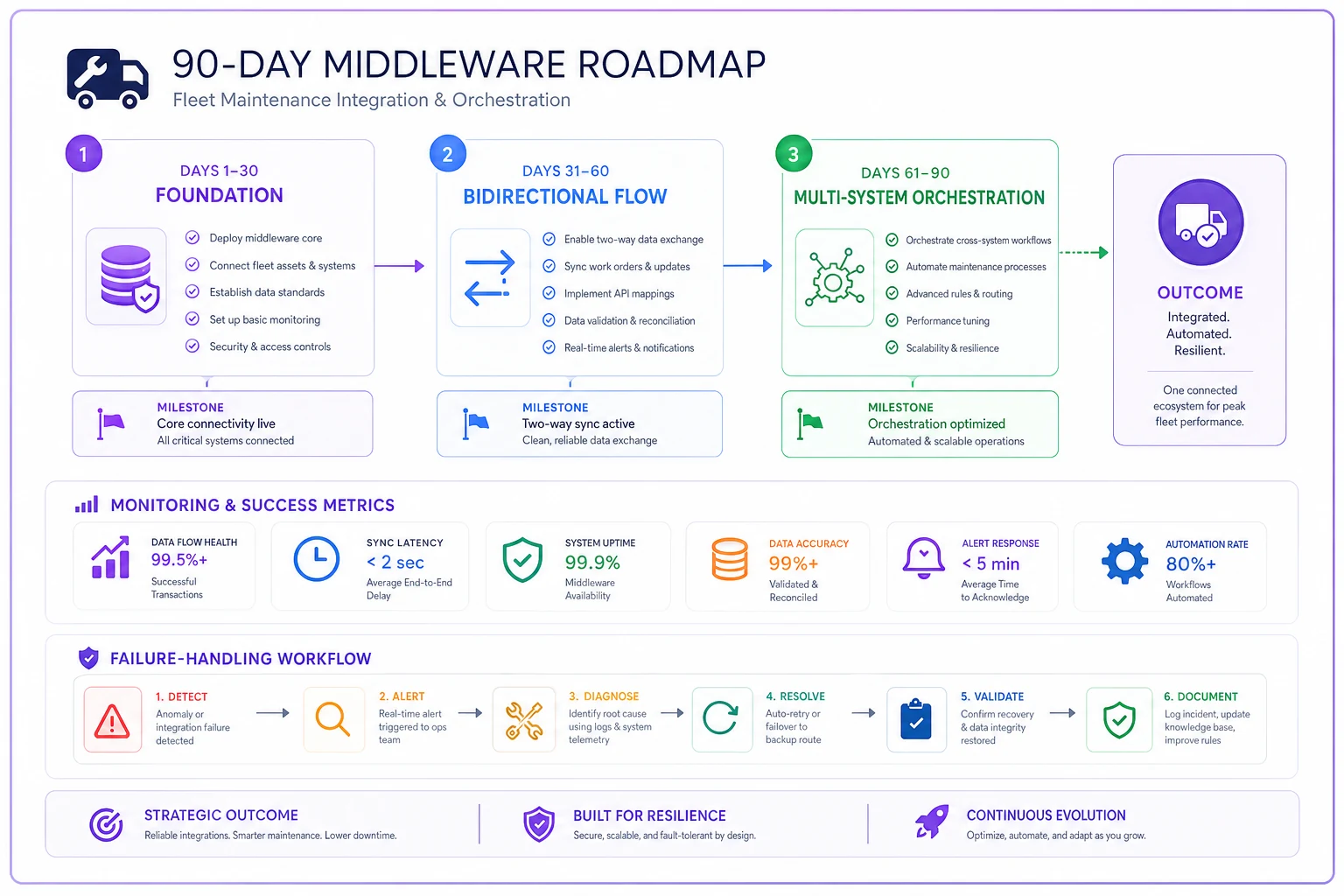
Use this to align your team on milestones and responsibilities.
Why traditional middleware makes fleet problems worse
Generic middleware doesn't understand fleet operations. It can move data between systems, but it doesn't know that a brake chamber failure is more critical than a cabin light malfunction.
Enterprise service buses (ESBs) treat all messages equally. Your PM reminder sits in the same queue as a critical safety recall. Message brokers like RabbitMQ or Kafka provide reliable delivery but no business logic — you still need to build all the fleet-specific routing, prioritization, and error handling yourself.
Most middleware also assumes stable schemas. Fleet maintenance systems evolve constantly: new fault codes from OEMs, changing regulations, updated PM schedules. Your integration layer needs to handle schema drift without breaking downstream systems.
One mid-sized trucking company spent $400k on enterprise middleware, then had to build another $200k of custom code on top just to handle fleet-specific logic. The predictive maintenance models they wanted to integrate required data transformations their ESB simply couldn't handle.
Building vs buying (and why most fleets get this wrong)
The build-vs-buy decision usually comes down to control vs speed. But fleets tend to optimize for the wrong thing.
Building gives you complete control over every data mapping, error handler, and retry policy. A private fleet with 125 specialized vehicles built their own integration layer because no commercial solution understood their custom maintenance workflows. It took 18 months and around $350k — but they got exactly what they needed.
Buying gets you running faster. Most commercial fleet management platforms include pre-built connectors for common systems. The catch is those connectors make assumptions about your operations: all vehicles maintained at one shop, PM schedules following OEM recommendations, parts inventory centrally managed. If your operation doesn't fit that mold, you'll be fighting the tool constantly.
There's a middle option worth considering — platforms configurable enough to model your specific operations without requiring a full custom build. AI-powered operational software can learn your specific patterns and adapt integrations around them instead of relying on hard-coded rules. A beverage distributor with 200 delivery trucks switched from custom integrations to one of these platforms and found it noticed seasonal patterns — like prioritizing refrigeration unit repairs in summer — and adjusted integration priorities automatically. Setup took about 3 weeks instead of 6 months.
When your integration architecture becomes the bottleneck
Around 150-200 vehicles, most integration architectures hit a wall. Not a technical wall — the servers can handle the load. It's an operational complexity wall where exceptions start overwhelming your team's ability to manage them.
Every integration point generates exceptions: wrong data formats, missing fields, timeout errors, business rule violations. With 3 systems and 50 vehicles, you might see 20-30 exceptions daily. Manageable. With 8 systems and 200 vehicles, you're looking at 300-400 per day. Your team spends more time fixing integration issues than managing the fleet.
The solution isn't better error handling — it's fewer errors. That means defensive data contracts that validate before sending, business logic that prevents invalid states from forming, self-healing workflows that fix common problems automatically, and integration patterns that embrace eventual consistency.
A construction fleet with 280 vehicles cut integration exceptions by around 75% just by adding pre-validation rules. Instead of sending invalid work orders that failed downstream, they caught problems at the source. Simple checks — "vehicle can't be in two locations simultaneously," "PM intervals can't exceed OEM maximum" — prevented most of the errors before they ever hit the wire.
The real cost of bad integrations
Failed integrations don't just delay data. They erode trust in your systems, and once dispatchers stop trusting the data, they build their own shadow processes that compound everything.
When dispatchers can't trust vehicle availability, they maintain spreadsheets. When technicians doubt parts inventory accuracy, they hoard common items. When managers question maintenance costs, they demand manual reports.
Now you're paying for integrated systems while operating with manual processes. A regional carrier found their dispatchers were calling the shop every morning to verify which trucks were actually available — despite having a "real-time" integration in place. The integration worked, technically. But after too many surprises, nobody trusted it anymore.
Rebuilding that trust requires transparent data lineage (show where data comes from), confidence indicators (this status is 95% certain), clear override mechanisms (humans can always intervene), and audit trails that explain decisions. None of that is technically complicated — it just rarely gets prioritized during the initial build.
The integration strategy that actually scales
Fleets under 50 vehicles can often survive with point-to-point integrations and manual coordination. Beyond that, you need an architecture that scales with complexity, not just volume.
Start with a clear data ownership model. Each piece of information should have exactly one system of record. Maintenance owns repair history. Telematics owns real-time location. Dispatch owns route assignments. Other systems can cache this data but shouldn't modify it.
Build integration patterns that assume failure. Systems will go down, networks will fail, data will conflict. Your architecture should handle these gracefully without requiring human intervention for every common case.
Implement progressive enhancement. Start with basic status sync, add predictive capabilities once you've validated the foundation. Building AI-powered maintenance optimization on top of unreliable data feeds is just adding more ways to fail.
Most importantly, design for operations, not IT. Your integration architecture should make dispatch managers' jobs easier — not satisfy enterprise architecture principles. The best integration is invisible to the people using it.
Fleet maintenance integrations fail when they're treated as technical projects instead of operational improvements. The technology itself is mature — CDC, APIs, and event-driven patterns all work. The challenge is defining what success looks like for your specific operation, then building contracts, schemas, and workflows that support it. Your fleet doesn't need perfect integrations. It needs integrations that fail predictably, recover gracefully, and improve over time. Start with clear contracts, implement proper monitoring, and build trust through transparency. The rest is just middleware.
Ready to maximize fleet uptime and reduce maintenance costs?
Join 2,000+ fleet managers using Fleetelyly to streamline maintenance workflows and improve vehicle reliability.